Prediction Market WebSocket API: Real-Time Feeds for Developers
Prediction Market WebSocket API: Real-Time Feeds for Developers
Prediction Market WebSocket API: Real-Time Feeds for Developers
Discover the Assymetrix WebSocket API for seamless real-time prediction market data. Simplify integration with a single access point.

Prediction Market WebSocket API: Real-Time Feeds for Developers
Use the Assymetrix unified WebSocket API at api.assymetrix.com for a single, normalized connection to real-time prediction-market streams across Polymarket, Kalshi, and Limitless. Three reasons this is the right call for most developers:
Normalized schema with cross-venue mapping. Every message arrives in a canonical format regardless of source venue, so you write one parser instead of three.
Single
x-api-keyauthentication with a dedicated sandbox endpoint. One credential, one handshake, one integration path to test before going live.Production-grade backfill and replay. Historical data is available through the same interface, so intraday replay and post-disconnect re-sync do not require a separate pipeline.
Maintaining separate connections to Polymarket, Kalshi, and Limitless simultaneously means three authentication schemes, three heartbeat loops, three sequence-gap handlers, and three parsers with divergent field names. Assymetrix collapses that into one.
Key Takeaways
A unified, normalized WebSocket feed is the fastest path to a production-grade prediction-market data consumer because it replaces three separate integration surfaces with one.
Point | Details |
|---|---|
Use one connection | Assymetrix’s unified WebSocket at |
Resolve symbols first | Always fetch |
Sequence gaps are critical | On any gap, discard local book state and request a fresh |
Backend connections only | Browsers cannot set WebSocket upgrade headers; run authenticated streams from a server-side process or edge worker. |
Replay at scale | Assymetrix provides 200M+ price snapshots for intraday replay through the same WebSocket schema as the live feed. |
Table of Contents
What does the Assymetrix WebSocket feed actually stream?
How do you authenticate and connect to the WebSocket?
How do you fetch active markets before subscribing?
What does a subscription message look like, and what fields matter?
Working Python async WebSocket example
What does a production-hardened consumer need?
Which developer use cases fit a real-time prediction-market feed?
Why does the Assymetrix Data API stand out for real-time prediction-market feeds?
Quick-start checklist: from API key to first live message
Why unified feeds save more engineering time than most developers expect
The Assymetrix Data API is ready when you are
Sources
What does the Assymetrix WebSocket feed actually stream?
The real-time feed covers the full event lifecycle you need to build a production-grade prediction-market application.
Stream types available:
Orderbook deltas and snapshots — incremental book updates keyed by
instrumentSymbol, plus on-demand snapshots for re-syncTrades and fills — matched trade records with price, size, side, and venue timestamp
Best bid/ask — top-of-book updates for low-latency signal consumers
Contract lifecycle events — market creation, resolution, and settlement notifications
Account and wallet events — position updates, balance changes, and order lifecycle (open, partial fill, cancel, expire)
Normalization features:
Canonical
instrumentSymbolmapping across venues (one symbol per contract regardless of source)Monotonic
sequencenumbers per channel for gap detectionMulti-timestamp support:
ts_venue(exchange-assigned),ts_ingest(Assymetrix ingest), andts_received_ptp(PTP-synchronized, nanosecond precision where available) — the same timestamp architecture that Databento documents for precision-critical feedsSandbox endpoint for integration testing, separate from production
Backfill and replay:
Capability | Detail |
|---|---|
Historical depth | Over a terabyte of trading activity with hundreds of millions of rows available |
Price snapshots | 200M+ snapshots available for replay |
Replay interface | Same WebSocket schema as live feed |
Sandbox | Separate endpoint; mirrors production message format |
How do you authenticate and connect to the WebSocket?
The short answer: send your x-api-key as a header during the WebSocket upgrade handshake. Keys are generated at dashboard.assymetrix.com/api-keys.
Browsers cannot set arbitrary HTTP headers on a WebSocket upgrade request, which means authenticated streams must run from a backend service, an edge worker, or a server-side process. Gemini’s prediction-markets WebSocket documentation makes the same point explicitly: authentication happens at handshake time via headers, and browser environments are unsuitable for this pattern.
Endpoints:
Production:
wss://api.assymetrix.com/wsSandbox:
wss://sandbox.api.assymetrix.com/ws
Required header:
x-api-key: YOUR_API_KEY
x-api-key: YOUR_API_KEY
Pre-connection checklist:
Create an API key at
dashboard.assymetrix.com/api-keysStore the key in an environment variable (
X_API_KEY) — never hardcode itConnect to the sandbox endpoint first and confirm you receive a heartbeat
Rotate keys on a schedule; treat them as short-lived credentials
Pro Tip: Run the WebSocket client as a dedicated backend process or containerized service. Never expose the raw x-api-key to a browser client. If you need to push data to a UI, have the backend relay sanitized messages over a separate, unauthenticated internal WebSocket.
How do you fetch active markets before subscribing?
Always resolve the instrumentSymbol from the REST API before opening a WebSocket subscription. Prediction-market contracts expire; subscribing to a stale symbol produces no data and no error in most implementations.
The workflow:
GET https://api.assymetrix.com/eventsreturns paginated active markets with contract metadataEach contract object includes
instrumentSymbol, the canonical identifier used in WebSocket subscriptionsPaginate with
?page=1&limit=100(or the documented cursor parameter) untilhas_moreisfalseFilter by venue, category, or resolution date to narrow the symbol list before subscribing
Pagination and rate-limit notes:
Fetch market lists at startup and refresh on a schedule (every 60–300 seconds for active-contract changes)
Respect
Retry-Afterheaders if you hit rate limits; use exponential backoff on429responsesCache the symbol list locally; do not re-fetch on every reconnect unless the reconnect gap exceeds your refresh interval
The REST-to-WebSocket handoff is the most common source of “no data” bugs. Confirm instrumentSymbol resolves to an active contract before subscribing, and log the full contract metadata alongside the symbol for debugging.
What does a subscription message look like, and what fields matter?
Subscribe by sending a JSON control message after the connection is established. The feed then pushes events matching your subscription until you unsubscribe or disconnect.
Subscription message (example):
{
  "action": "subscribe",
  "channel": "orderbook",
  "symbol": "TRUMP-WIN-2026"
}
{
  "action": "subscribe",
  "channel": "orderbook",
  "symbol": "TRUMP-WIN-2026"
}
Core event types:
book_snapshot— full orderbook state, sent on subscribe or after re-sync requestbook_delta— incremental update (side, price level, new size; size=0 means remove)best_bid_ask— top-of-book only; lower bandwidth for signal consumerslast_trade_price— most recent matched tradeorder_open,order_fill,order_cancel,order_expire— order lifecyclecontract_created,contract_resolved,contract_settled— market lifecycleposition_update— account-level position change
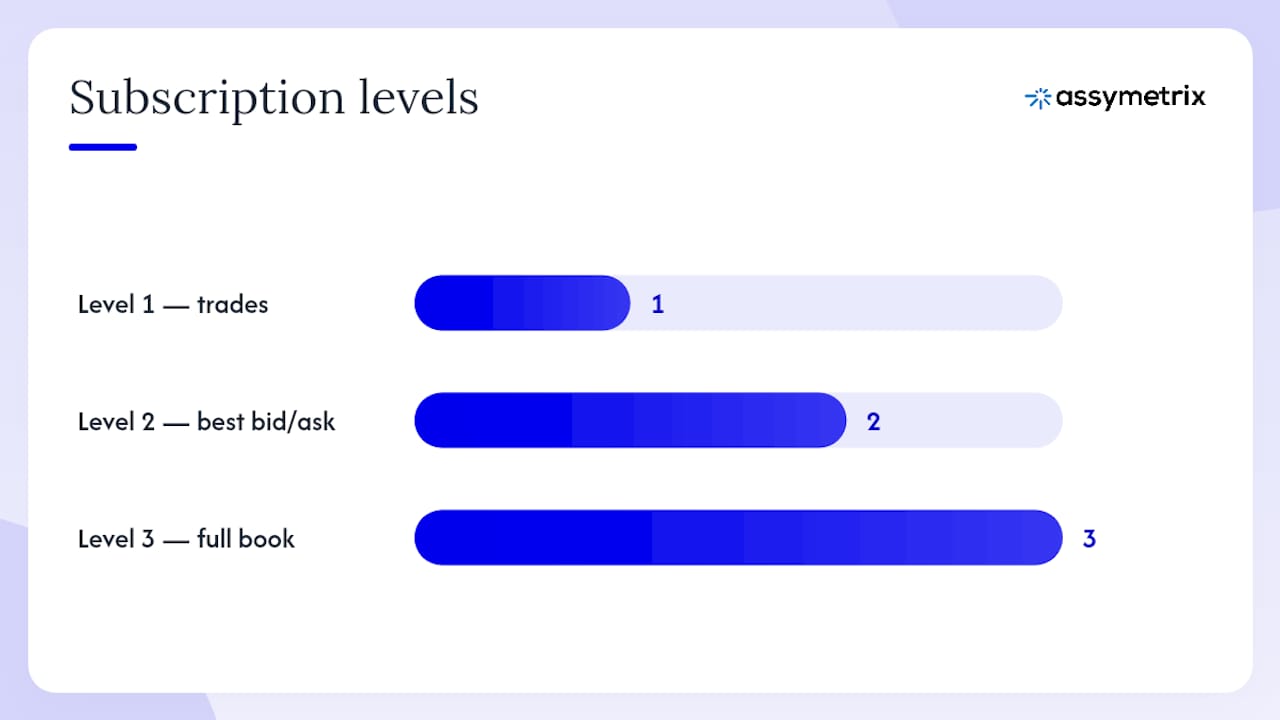
Openfish’s market channel documentation illustrates a common pattern: subscription levels (1 = trades, 2 = best bid/ask, 3 = full book) with an initial snapshot sent only on request, and a PING/PONG heartbeat every 10 seconds. Assymetrix follows a comparable structure.
Normalized message schema:
Field | Type | Description |
|---|---|---|
| integer | Monotonic counter per channel; gap = missed message |
| int64 nanoseconds | PTP-synchronized receive timestamp |
| int64 nanoseconds | Venue-assigned event timestamp |
| int64 nanoseconds | Assymetrix ingest timestamp |
| string | One of the event types listed above |
| string | Canonical |
| array |
|
| array |
|
| decimal | Trade or order price |
| decimal | Quantity |
| string |
|
| string | Venue-native order identifier |
| decimal | Signed position delta for account events |
Pro Tip: After every reconnect, check whether the first sequence you receive is contiguous with the last one you stored. If there is a gap, discard your local book state and request a book_snapshot before processing any deltas. Relying on missed deltas being replayed is unsafe — Polymarket’s WebSocket docs explicitly require a REST re-fetch after disconnect for exactly this reason.
Working Python async WebSocket example
The snippet below connects to the Assymetrix sandbox, fetches active markets via REST, subscribes to the first active symbol, and prints best-bid/ask updates. It includes heartbeat handling and a reconnect loop with exponential backoff.
Dependencies:
pip install websockets httpx python-dotenv
pip install websockets httpx python-dotenv
Environment setup (.env):
X_API_KEY=your_key_here
ASSYMETRIX_WS=wss://sandbox.api.assymetrix.com/ws
ASSYMETRIX_REST=https://api.assymetrix.com
X_API_KEY=your_key_here
ASSYMETRIX_WS=wss://sandbox.api.assymetrix.com/ws
ASSYMETRIX_REST=https://api.assymetrix.com
Client code:
import asyncio
import json
import os
import httpx
import websockets
from dotenv import load_dotenv

load_dotenv()

API_KEY = os.environ["X_API_KEY"]
WS_URL  = os.environ["ASSYMETRIX_WS"]
REST_URL = os.environ["ASSYMETRIX_REST"]

HEADERS = {"x-api-key": API_KEY}

async def fetch_active_symbol() -> str:
    """Fetch the first active instrumentSymbol from the REST /events endpoint."""
    async with httpx.AsyncClient() as client:
        page = 1
        while True:
            r = await client.get(
                f"{REST_URL}/events",
                headers=HEADERS,
                params={"page": page, "limit": 100},
            )
            r.raise_for_status()
            data = r.json()
            events = data.get("events", [])
            for event in events:
                for contract in event.get("contracts", []):
                    symbol = contract.get("instrumentSymbol")
                    if symbol:
                        return symbol
            if not data.get("has_more"):
                break
            page += 1
    raise RuntimeError("No active instrumentSymbol found.")

async def connect_and_stream():
    symbol = await fetch_active_symbol()
    print(f"Subscribing to: {symbol}")

    last_sequence = None
    backoff = 1

    while True:
        try:
            async with websockets.connect(
                WS_URL,
                additional_headers=HEADERS,
                ping_interval=10,
                ping_timeout=20,
            ) as ws:
                backoff = 1  # reset on successful connect

                # Subscribe to best bid/ask channel
                await ws.send(json.dumps({
                    "action": "subscribe",
                    "channel": "best_bid_ask",
                    "symbol": symbol,
                }))

                async for raw in ws:
                    if raw in ("ping", "PING"):
                        await ws.send("pong")
                        continue

                    msg = json.loads(raw)
                    seq = msg.get("sequence")

                    # Sequence-gap detection
                    if last_sequence is not None and seq is not None:
                        if seq != last_sequence + 1:
                            print(f"[WARN] Sequence gap: expected {last_sequence + 1}, got {seq}. Re-syncing.")
                            # In production: request book_snapshot here
                            last_sequence = None
                            continue

                    last_sequence = seq

                    if msg.get("event_type") == "best_bid_ask":
                        print(
                            f"{msg['symbol']} | "
                            f"bid={msg.get('bids', [[None]])[0][0]} "
                            f"ask={msg.get('asks', [[None]])[0][0]} | "
                            f"ts_venue={msg.get('ts_venue')}"
                        )

        except (websockets.ConnectionClosed, OSError) as exc:
            print(f"[ERROR] Connection lost: {exc}. Reconnecting in {backoff}s.")
            await asyncio.sleep(backoff)
            backoff = min(backoff * 2, 60)  # cap at 60s

if __name__ == "__main__":
    asyncio.run(connect_and_stream())
import asyncio
import json
import os
import httpx
import websockets
from dotenv import load_dotenv

load_dotenv()

API_KEY = os.environ["X_API_KEY"]
WS_URL  = os.environ["ASSYMETRIX_WS"]
REST_URL = os.environ["ASSYMETRIX_REST"]

HEADERS = {"x-api-key": API_KEY}

async def fetch_active_symbol() -> str:
    """Fetch the first active instrumentSymbol from the REST /events endpoint."""
    async with httpx.AsyncClient() as client:
        page = 1
        while True:
            r = await client.get(
                f"{REST_URL}/events",
                headers=HEADERS,
                params={"page": page, "limit": 100},
            )
            r.raise_for_status()
            data = r.json()
            events = data.get("events", [])
            for event in events:
                for contract in event.get("contracts", []):
                    symbol = contract.get("instrumentSymbol")
                    if symbol:
                        return symbol
            if not data.get("has_more"):
                break
            page += 1
    raise RuntimeError("No active instrumentSymbol found.")

async def connect_and_stream():
    symbol = await fetch_active_symbol()
    print(f"Subscribing to: {symbol}")

    last_sequence = None
    backoff = 1

    while True:
        try:
            async with websockets.connect(
                WS_URL,
                additional_headers=HEADERS,
                ping_interval=10,
                ping_timeout=20,
            ) as ws:
                backoff = 1  # reset on successful connect

                # Subscribe to best bid/ask channel
                await ws.send(json.dumps({
                    "action": "subscribe",
                    "channel": "best_bid_ask",
                    "symbol": symbol,
                }))

                async for raw in ws:
                    if raw in ("ping", "PING"):
                        await ws.send("pong")
                        continue

                    msg = json.loads(raw)
                    seq = msg.get("sequence")

                    # Sequence-gap detection
                    if last_sequence is not None and seq is not None:
                        if seq != last_sequence + 1:
                            print(f"[WARN] Sequence gap: expected {last_sequence + 1}, got {seq}. Re-syncing.")
                            # In production: request book_snapshot here
                            last_sequence = None
                            continue

                    last_sequence = seq

                    if msg.get("event_type") == "best_bid_ask":
                        print(
                            f"{msg['symbol']} | "
                            f"bid={msg.get('bids', [[None]])[0][0]} "
                            f"ask={msg.get('asks', [[None]])[0][0]} | "
                            f"ts_venue={msg.get('ts_venue')}"
                        )

        except (websockets.ConnectionClosed, OSError) as exc:
            print(f"[ERROR] Connection lost: {exc}. Reconnecting in {backoff}s.")
            await asyncio.sleep(backoff)
            backoff = min(backoff * 2, 60)  # cap at 60s

if __name__ == "__main__":
    asyncio.run(connect_and_stream())
For a deeper Python integration reference, including client libraries and additional request patterns, see the Assymetrix Python developer guide.
What does a production-hardened consumer need?
A working connection is not a production consumer. The gap between the two is where most real-time feed integrations fail under load or after a network event.
Core requirements:
Heartbeat/keepalive. Respond to PING frames within the server’s timeout window (10 seconds is a common interval, per Openfish’s documented heartbeat). Set
ping_intervalandping_timeoutin your WebSocket client.Exponential backoff with jitter. Start at 1 second, double on each failure, cap at 60 seconds, add
random.uniform(0, 1)to prevent thundering-herd reconnects.Sequence-gap detection and REST re-sync. On any gap, discard local book state and request a fresh snapshot before processing further deltas.
Idempotent order handling. Use deterministic order IDs (venue
order_id+ sequence) as deduplication keys in your storage layer. Reconnects can deliver duplicate fill events.Observability. Track: p50/p99 message latency (using
ts_ingestminusts_venue), missed-sequence count per channel, connection churn rate, and parse error count.
Rate-limit handling:
Test your subscription count and message volume in the sandbox before going live. If you receive 429 or a server-side close with code 1008, back off and reduce subscription scope. Batch symbol subscriptions into fewer channels where the API supports it.
Pro Tip: Write incoming messages to a small in-process ring buffer first, then drain to persistent storage in batches. This decouples your network consumer from your write path and prevents a slow database write from causing message loss. Store last_seen_sequence and last_seen_ts as a checkpoint so you can reconstruct the exact reconnect state after a crash.
Which developer use cases fit a real-time prediction-market feed?
The WebSocket feed maps cleanly to several common implementation patterns, each with different latency and depth requirements.
Live dashboards. Subscribe to
best_bid_askfor all active contracts. Latency tolerance is moderate (sub-second is fine); orderbook depth is not needed. Usets_ingestfor display timestamps.Market-making bots. Require full
book_snapshotplusbook_deltastreams. Sequence integrity is critical; any gap must trigger an immediate re-sync before placing orders. Timestamp precision (ts_venue) matters for queue-position estimation.Cross-venue arbitrage scanners. The Assymetrix normalized feed is the natural fit here: the same
instrumentSymbolappears across Polymarket, Kalshi, and Limitless, so price divergence is a simple field comparison rather than a fuzzy-match problem. See the cross-venue arbitrage strategy guide for signal construction patterns.AI agent signal inputs. Agents consuming
last_trade_priceandbest_bid_askneed low-latency delivery and clean JSON. The normalized schema removes the parsing overhead that would otherwise consume agent context or compute budget.Intraday backtesting with streaming replay. Use the historical replay interface with the same WebSocket schema as live data. This lets you validate reconnection logic, sequence handling, and parser correctness against real historical sequences before touching production.
Why does the Assymetrix Data API stand out for real-time prediction-market feeds?
A single normalized WebSocket removes the cost of multiple vendor connections and the normalization work that comes with them. Connecting to multiple venue-native feeds means implementing separate parsers, heartbeat loops, and sequence handlers for each venue — the same complexity problem that enterprise data infrastructure like Bloomberg B-PIPE was built to solve for equities. Assymetrix applies that same consolidation logic to prediction markets.
The Assymetrix Data API is built on approximately 1.5 terabytes of historical data spanning nearly one billion rows of trading activity, with over 200 million price snapshots available for replay and backfill. That dataset scale means the replay interface is not a demo feature; it is the same infrastructure that serves production historical queries.
Trust signals worth noting:
Dedicated sandbox endpoint mirroring the production schema
Documented normalized field set with multi-timestamp support (venue, ingest, PTP)
Backfill and intraday replay through the same WebSocket interface
Smart Money wallet tracking and Trader Skill Scores layered on top of the raw feed
Cross-venue arbitrage signal generation from normalized price data
Developer documentation at
data.assymetrix.com
For developers building on Polymarket and Kalshi specifically, the cross-venue normalization guide covers how contract symbols are mapped and how venue-specific quirks are abstracted away.
Quick-start checklist: from API key to first live message
Follow these steps in order. Each one has a concrete validation signal so you know it worked before moving to the next.
Create an API key at
dashboard.assymetrix.com/api-keys. Copy it immediately; it is shown once.Set the environment variable
X_API_KEYin your shell or.envfile. Confirm withecho $X_API_KEY.Test the REST endpoint. Run
curl -H "x-api-key: $X_API_KEY" https://api.assymetrix.com/events?limit=5. You should see a JSON array of active events.Extract an
instrumentSymbolfrom the response. Pick a contract with a resolution date in the future.Connect to the sandbox WebSocket at
wss://sandbox.api.assymetrix.com/wswith thex-api-keyheader.Send a subscription message for
best_bid_askon your chosen symbol.Confirm you receive messages. Check that
sequenceincrements monotonically andts_venueis a recent nanosecond timestamp.Simulate a disconnect. Kill the connection and verify your reconnect loop re-establishes within your backoff window and requests a fresh snapshot.
Pro Tip: For a one-line smoke test, use websocat with a header flag: websocat -H "x-api-key: $X_API_KEY" wss://sandbox.api.assymetrix.com/ws. Send the subscription JSON manually and watch raw messages scroll. Log the first 100 messages to a file and inspect sequence continuity and timestamp deltas before writing any application logic.
Why unified feeds save more engineering time than most developers expect
Building against three separate venue WebSocket APIs is not three times the work of building against one. It is closer to ten times, because the failure modes compound. Each venue has its own reconnect behavior, its own heartbeat interval, its own timestamp epoch, and its own definition of what a “cancel” event looks like. When you normalize across three of them, you are not just writing three parsers; you are writing a reconciliation layer that has to handle every combination of partial failures.
The deeper problem is replay. When a venue does not replay missed deltas after a reconnect (and most do not, as Polymarket’s WebSocket documentation makes explicit), you need a REST snapshot endpoint for each venue, each with its own pagination scheme and rate limits. A unified feed with a single snapshot interface and a single sequence namespace cuts that surface area to one.
There is also a subtler issue with timestamps. Cross-venue arbitrage signals are only meaningful if you can compare prices at the same point in time. Venue timestamps are not synchronized to a common clock, so a naive comparison of ts_venue across Polymarket and Kalshi can show a spurious arbitrage that is actually just clock skew. PTP-synchronized timestamps, exposed as ts_received_ptp in the Assymetrix schema, give you a common reference frame without building your own clock-sync infrastructure.
The Assymetrix Data API is ready when you are
Developers who need a production-ready real-time prediction-market feed without building three separate integrations from scratch have a direct path: the Assymetrix Data API at data.assymetrix.com gives you one normalized WebSocket connection to Polymarket, Kalshi, and Limitless, backed by 1.5 TB of historical data and a sandbox that mirrors the production schema exactly.
Create your API key at dashboard.assymetrix.com/api-keys, point your client at the sandbox endpoint, and run through the quick-start checklist above. For developers building arbitrage scanners or AI agent signal pipelines, the cross-venue quant signals guide pairs directly with the real-time feed. Log every message for the first 24 hours of your trial and validate sequence continuity before switching to production; that single step catches the majority of integration issues before they affect live data.
Sources
FAQ
What is a prediction market WebSocket API?
A prediction market WebSocket API is a persistent, bidirectional connection that streams real-time orderbook, trade, and contract lifecycle events from prediction-market venues like Polymarket and Kalshi. Unlike REST polling, it pushes updates as they occur, with no repeated HTTP overhead.
How do you authenticate with the Assymetrix WebSocket feed?
Send your x-api-key header during the WebSocket upgrade handshake. Keys are generated at dashboard.assymetrix.com/api-keys. Browser clients cannot set this header, so the connection must run from a backend service.
What should you do when a WebSocket connection drops?
Reconnect with exponential backoff, then request a fresh book_snapshot for any subscribed symbol before processing further deltas. Do not assume missed deltas will be replayed; treat the local book state as stale after any disconnect.
Why use a unified feed instead of connecting to each venue directly?
Each venue exposes a different schema, heartbeat interval, timestamp epoch, and reconnect behavior. A unified feed like Assymetrix normalizes all of that into one schema and one sequence namespace, removing the need for per-venue parsers and a cross-venue clock-sync layer.
Can you use the Assymetrix feed for historical backtesting and live trading in the same pipeline?
Yes. The historical replay interface uses the same WebSocket schema as the live feed, so reconnection logic, sequence handling, and parsers written for production work unchanged against replayed data.
Prediction Market WebSocket API: Real-Time Feeds for Developers
Use the Assymetrix unified WebSocket API at api.assymetrix.com for a single, normalized connection to real-time prediction-market streams across Polymarket, Kalshi, and Limitless. Three reasons this is the right call for most developers:
Normalized schema with cross-venue mapping. Every message arrives in a canonical format regardless of source venue, so you write one parser instead of three.
Single
x-api-keyauthentication with a dedicated sandbox endpoint. One credential, one handshake, one integration path to test before going live.Production-grade backfill and replay. Historical data is available through the same interface, so intraday replay and post-disconnect re-sync do not require a separate pipeline.
Maintaining separate connections to Polymarket, Kalshi, and Limitless simultaneously means three authentication schemes, three heartbeat loops, three sequence-gap handlers, and three parsers with divergent field names. Assymetrix collapses that into one.
Key Takeaways
A unified, normalized WebSocket feed is the fastest path to a production-grade prediction-market data consumer because it replaces three separate integration surfaces with one.
Point | Details |
|---|---|
Use one connection | Assymetrix’s unified WebSocket at |
Resolve symbols first | Always fetch |
Sequence gaps are critical | On any gap, discard local book state and request a fresh |
Backend connections only | Browsers cannot set WebSocket upgrade headers; run authenticated streams from a server-side process or edge worker. |
Replay at scale | Assymetrix provides 200M+ price snapshots for intraday replay through the same WebSocket schema as the live feed. |
Table of Contents
What does the Assymetrix WebSocket feed actually stream?
How do you authenticate and connect to the WebSocket?
How do you fetch active markets before subscribing?
What does a subscription message look like, and what fields matter?
Working Python async WebSocket example
What does a production-hardened consumer need?
Which developer use cases fit a real-time prediction-market feed?
Why does the Assymetrix Data API stand out for real-time prediction-market feeds?
Quick-start checklist: from API key to first live message
Why unified feeds save more engineering time than most developers expect
The Assymetrix Data API is ready when you are
Sources
What does the Assymetrix WebSocket feed actually stream?
The real-time feed covers the full event lifecycle you need to build a production-grade prediction-market application.
Stream types available:
Orderbook deltas and snapshots — incremental book updates keyed by
instrumentSymbol, plus on-demand snapshots for re-syncTrades and fills — matched trade records with price, size, side, and venue timestamp
Best bid/ask — top-of-book updates for low-latency signal consumers
Contract lifecycle events — market creation, resolution, and settlement notifications
Account and wallet events — position updates, balance changes, and order lifecycle (open, partial fill, cancel, expire)
Normalization features:
Canonical
instrumentSymbolmapping across venues (one symbol per contract regardless of source)Monotonic
sequencenumbers per channel for gap detectionMulti-timestamp support:
ts_venue(exchange-assigned),ts_ingest(Assymetrix ingest), andts_received_ptp(PTP-synchronized, nanosecond precision where available) — the same timestamp architecture that Databento documents for precision-critical feedsSandbox endpoint for integration testing, separate from production
Backfill and replay:
Capability | Detail |
|---|---|
Historical depth | Over a terabyte of trading activity with hundreds of millions of rows available |
Price snapshots | 200M+ snapshots available for replay |
Replay interface | Same WebSocket schema as live feed |
Sandbox | Separate endpoint; mirrors production message format |
How do you authenticate and connect to the WebSocket?
The short answer: send your x-api-key as a header during the WebSocket upgrade handshake. Keys are generated at dashboard.assymetrix.com/api-keys.
Browsers cannot set arbitrary HTTP headers on a WebSocket upgrade request, which means authenticated streams must run from a backend service, an edge worker, or a server-side process. Gemini’s prediction-markets WebSocket documentation makes the same point explicitly: authentication happens at handshake time via headers, and browser environments are unsuitable for this pattern.
Endpoints:
Production:
wss://api.assymetrix.com/wsSandbox:
wss://sandbox.api.assymetrix.com/ws
Required header:
x-api-key: YOUR_API_KEY
Pre-connection checklist:
Create an API key at
dashboard.assymetrix.com/api-keysStore the key in an environment variable (
X_API_KEY) — never hardcode itConnect to the sandbox endpoint first and confirm you receive a heartbeat
Rotate keys on a schedule; treat them as short-lived credentials
Pro Tip: Run the WebSocket client as a dedicated backend process or containerized service. Never expose the raw x-api-key to a browser client. If you need to push data to a UI, have the backend relay sanitized messages over a separate, unauthenticated internal WebSocket.
How do you fetch active markets before subscribing?
Always resolve the instrumentSymbol from the REST API before opening a WebSocket subscription. Prediction-market contracts expire; subscribing to a stale symbol produces no data and no error in most implementations.
The workflow:
GET https://api.assymetrix.com/eventsreturns paginated active markets with contract metadataEach contract object includes
instrumentSymbol, the canonical identifier used in WebSocket subscriptionsPaginate with
?page=1&limit=100(or the documented cursor parameter) untilhas_moreisfalseFilter by venue, category, or resolution date to narrow the symbol list before subscribing
Pagination and rate-limit notes:
Fetch market lists at startup and refresh on a schedule (every 60–300 seconds for active-contract changes)
Respect
Retry-Afterheaders if you hit rate limits; use exponential backoff on429responsesCache the symbol list locally; do not re-fetch on every reconnect unless the reconnect gap exceeds your refresh interval
The REST-to-WebSocket handoff is the most common source of “no data” bugs. Confirm instrumentSymbol resolves to an active contract before subscribing, and log the full contract metadata alongside the symbol for debugging.
What does a subscription message look like, and what fields matter?
Subscribe by sending a JSON control message after the connection is established. The feed then pushes events matching your subscription until you unsubscribe or disconnect.
Subscription message (example):
{
  "action": "subscribe",
  "channel": "orderbook",
  "symbol": "TRUMP-WIN-2026"
}
Core event types:
book_snapshot— full orderbook state, sent on subscribe or after re-sync requestbook_delta— incremental update (side, price level, new size; size=0 means remove)best_bid_ask— top-of-book only; lower bandwidth for signal consumerslast_trade_price— most recent matched tradeorder_open,order_fill,order_cancel,order_expire— order lifecyclecontract_created,contract_resolved,contract_settled— market lifecycleposition_update— account-level position change
Openfish’s market channel documentation illustrates a common pattern: subscription levels (1 = trades, 2 = best bid/ask, 3 = full book) with an initial snapshot sent only on request, and a PING/PONG heartbeat every 10 seconds. Assymetrix follows a comparable structure.
Normalized message schema:
Field | Type | Description |
|---|---|---|
| integer | Monotonic counter per channel; gap = missed message |
| int64 nanoseconds | PTP-synchronized receive timestamp |
| int64 nanoseconds | Venue-assigned event timestamp |
| int64 nanoseconds | Assymetrix ingest timestamp |
| string | One of the event types listed above |
| string | Canonical |
| array |
|
| array |
|
| decimal | Trade or order price |
| decimal | Quantity |
| string |
|
| string | Venue-native order identifier |
| decimal | Signed position delta for account events |
Pro Tip: After every reconnect, check whether the first sequence you receive is contiguous with the last one you stored. If there is a gap, discard your local book state and request a book_snapshot before processing any deltas. Relying on missed deltas being replayed is unsafe — Polymarket’s WebSocket docs explicitly require a REST re-fetch after disconnect for exactly this reason.
Working Python async WebSocket example
The snippet below connects to the Assymetrix sandbox, fetches active markets via REST, subscribes to the first active symbol, and prints best-bid/ask updates. It includes heartbeat handling and a reconnect loop with exponential backoff.
Dependencies:
pip install websockets httpx python-dotenv
Environment setup (.env):
X_API_KEY=your_key_here
ASSYMETRIX_WS=wss://sandbox.api.assymetrix.com/ws
ASSYMETRIX_REST=https://api.assymetrix.com
Client code:
import asyncio
import json
import os
import httpx
import websockets
from dotenv import load_dotenv

load_dotenv()

API_KEY = os.environ["X_API_KEY"]
WS_URL  = os.environ["ASSYMETRIX_WS"]
REST_URL = os.environ["ASSYMETRIX_REST"]

HEADERS = {"x-api-key": API_KEY}

async def fetch_active_symbol() -> str:
    """Fetch the first active instrumentSymbol from the REST /events endpoint."""
    async with httpx.AsyncClient() as client:
        page = 1
        while True:
            r = await client.get(
                f"{REST_URL}/events",
                headers=HEADERS,
                params={"page": page, "limit": 100},
            )
            r.raise_for_status()
            data = r.json()
            events = data.get("events", [])
            for event in events:
                for contract in event.get("contracts", []):
                    symbol = contract.get("instrumentSymbol")
                    if symbol:
                        return symbol
            if not data.get("has_more"):
                break
            page += 1
    raise RuntimeError("No active instrumentSymbol found.")

async def connect_and_stream():
    symbol = await fetch_active_symbol()
    print(f"Subscribing to: {symbol}")

    last_sequence = None
    backoff = 1

    while True:
        try:
            async with websockets.connect(
                WS_URL,
                additional_headers=HEADERS,
                ping_interval=10,
                ping_timeout=20,
            ) as ws:
                backoff = 1  # reset on successful connect

                # Subscribe to best bid/ask channel
                await ws.send(json.dumps({
                    "action": "subscribe",
                    "channel": "best_bid_ask",
                    "symbol": symbol,
                }))

                async for raw in ws:
                    if raw in ("ping", "PING"):
                        await ws.send("pong")
                        continue

                    msg = json.loads(raw)
                    seq = msg.get("sequence")

                    # Sequence-gap detection
                    if last_sequence is not None and seq is not None:
                        if seq != last_sequence + 1:
                            print(f"[WARN] Sequence gap: expected {last_sequence + 1}, got {seq}. Re-syncing.")
                            # In production: request book_snapshot here
                            last_sequence = None
                            continue

                    last_sequence = seq

                    if msg.get("event_type") == "best_bid_ask":
                        print(
                            f"{msg['symbol']} | "
                            f"bid={msg.get('bids', [[None]])[0][0]} "
                            f"ask={msg.get('asks', [[None]])[0][0]} | "
                            f"ts_venue={msg.get('ts_venue')}"
                        )

        except (websockets.ConnectionClosed, OSError) as exc:
            print(f"[ERROR] Connection lost: {exc}. Reconnecting in {backoff}s.")
            await asyncio.sleep(backoff)
            backoff = min(backoff * 2, 60)  # cap at 60s

if __name__ == "__main__":
    asyncio.run(connect_and_stream())
For a deeper Python integration reference, including client libraries and additional request patterns, see the Assymetrix Python developer guide.
What does a production-hardened consumer need?
A working connection is not a production consumer. The gap between the two is where most real-time feed integrations fail under load or after a network event.
Core requirements:
Heartbeat/keepalive. Respond to PING frames within the server’s timeout window (10 seconds is a common interval, per Openfish’s documented heartbeat). Set
ping_intervalandping_timeoutin your WebSocket client.Exponential backoff with jitter. Start at 1 second, double on each failure, cap at 60 seconds, add
random.uniform(0, 1)to prevent thundering-herd reconnects.Sequence-gap detection and REST re-sync. On any gap, discard local book state and request a fresh snapshot before processing further deltas.
Idempotent order handling. Use deterministic order IDs (venue
order_id+ sequence) as deduplication keys in your storage layer. Reconnects can deliver duplicate fill events.Observability. Track: p50/p99 message latency (using
ts_ingestminusts_venue), missed-sequence count per channel, connection churn rate, and parse error count.
Rate-limit handling:
Test your subscription count and message volume in the sandbox before going live. If you receive 429 or a server-side close with code 1008, back off and reduce subscription scope. Batch symbol subscriptions into fewer channels where the API supports it.
Pro Tip: Write incoming messages to a small in-process ring buffer first, then drain to persistent storage in batches. This decouples your network consumer from your write path and prevents a slow database write from causing message loss. Store last_seen_sequence and last_seen_ts as a checkpoint so you can reconstruct the exact reconnect state after a crash.
Which developer use cases fit a real-time prediction-market feed?
The WebSocket feed maps cleanly to several common implementation patterns, each with different latency and depth requirements.
Live dashboards. Subscribe to
best_bid_askfor all active contracts. Latency tolerance is moderate (sub-second is fine); orderbook depth is not needed. Usets_ingestfor display timestamps.Market-making bots. Require full
book_snapshotplusbook_deltastreams. Sequence integrity is critical; any gap must trigger an immediate re-sync before placing orders. Timestamp precision (ts_venue) matters for queue-position estimation.Cross-venue arbitrage scanners. The Assymetrix normalized feed is the natural fit here: the same
instrumentSymbolappears across Polymarket, Kalshi, and Limitless, so price divergence is a simple field comparison rather than a fuzzy-match problem. See the cross-venue arbitrage strategy guide for signal construction patterns.AI agent signal inputs. Agents consuming
last_trade_priceandbest_bid_askneed low-latency delivery and clean JSON. The normalized schema removes the parsing overhead that would otherwise consume agent context or compute budget.Intraday backtesting with streaming replay. Use the historical replay interface with the same WebSocket schema as live data. This lets you validate reconnection logic, sequence handling, and parser correctness against real historical sequences before touching production.
Why does the Assymetrix Data API stand out for real-time prediction-market feeds?
A single normalized WebSocket removes the cost of multiple vendor connections and the normalization work that comes with them. Connecting to multiple venue-native feeds means implementing separate parsers, heartbeat loops, and sequence handlers for each venue — the same complexity problem that enterprise data infrastructure like Bloomberg B-PIPE was built to solve for equities. Assymetrix applies that same consolidation logic to prediction markets.
The Assymetrix Data API is built on approximately 1.5 terabytes of historical data spanning nearly one billion rows of trading activity, with over 200 million price snapshots available for replay and backfill. That dataset scale means the replay interface is not a demo feature; it is the same infrastructure that serves production historical queries.
Trust signals worth noting:
Dedicated sandbox endpoint mirroring the production schema
Documented normalized field set with multi-timestamp support (venue, ingest, PTP)
Backfill and intraday replay through the same WebSocket interface
Smart Money wallet tracking and Trader Skill Scores layered on top of the raw feed
Cross-venue arbitrage signal generation from normalized price data
Developer documentation at
data.assymetrix.com
For developers building on Polymarket and Kalshi specifically, the cross-venue normalization guide covers how contract symbols are mapped and how venue-specific quirks are abstracted away.
Quick-start checklist: from API key to first live message
Follow these steps in order. Each one has a concrete validation signal so you know it worked before moving to the next.
Create an API key at
dashboard.assymetrix.com/api-keys. Copy it immediately; it is shown once.Set the environment variable
X_API_KEYin your shell or.envfile. Confirm withecho $X_API_KEY.Test the REST endpoint. Run
curl -H "x-api-key: $X_API_KEY" https://api.assymetrix.com/events?limit=5. You should see a JSON array of active events.Extract an
instrumentSymbolfrom the response. Pick a contract with a resolution date in the future.Connect to the sandbox WebSocket at
wss://sandbox.api.assymetrix.com/wswith thex-api-keyheader.Send a subscription message for
best_bid_askon your chosen symbol.Confirm you receive messages. Check that
sequenceincrements monotonically andts_venueis a recent nanosecond timestamp.Simulate a disconnect. Kill the connection and verify your reconnect loop re-establishes within your backoff window and requests a fresh snapshot.
Pro Tip: For a one-line smoke test, use websocat with a header flag: websocat -H "x-api-key: $X_API_KEY" wss://sandbox.api.assymetrix.com/ws. Send the subscription JSON manually and watch raw messages scroll. Log the first 100 messages to a file and inspect sequence continuity and timestamp deltas before writing any application logic.
Why unified feeds save more engineering time than most developers expect
Building against three separate venue WebSocket APIs is not three times the work of building against one. It is closer to ten times, because the failure modes compound. Each venue has its own reconnect behavior, its own heartbeat interval, its own timestamp epoch, and its own definition of what a “cancel” event looks like. When you normalize across three of them, you are not just writing three parsers; you are writing a reconciliation layer that has to handle every combination of partial failures.
The deeper problem is replay. When a venue does not replay missed deltas after a reconnect (and most do not, as Polymarket’s WebSocket documentation makes explicit), you need a REST snapshot endpoint for each venue, each with its own pagination scheme and rate limits. A unified feed with a single snapshot interface and a single sequence namespace cuts that surface area to one.
There is also a subtler issue with timestamps. Cross-venue arbitrage signals are only meaningful if you can compare prices at the same point in time. Venue timestamps are not synchronized to a common clock, so a naive comparison of ts_venue across Polymarket and Kalshi can show a spurious arbitrage that is actually just clock skew. PTP-synchronized timestamps, exposed as ts_received_ptp in the Assymetrix schema, give you a common reference frame without building your own clock-sync infrastructure.
The Assymetrix Data API is ready when you are
Developers who need a production-ready real-time prediction-market feed without building three separate integrations from scratch have a direct path: the Assymetrix Data API at data.assymetrix.com gives you one normalized WebSocket connection to Polymarket, Kalshi, and Limitless, backed by 1.5 TB of historical data and a sandbox that mirrors the production schema exactly.
Create your API key at dashboard.assymetrix.com/api-keys, point your client at the sandbox endpoint, and run through the quick-start checklist above. For developers building arbitrage scanners or AI agent signal pipelines, the cross-venue quant signals guide pairs directly with the real-time feed. Log every message for the first 24 hours of your trial and validate sequence continuity before switching to production; that single step catches the majority of integration issues before they affect live data.
Sources
FAQ
What is a prediction market WebSocket API?
A prediction market WebSocket API is a persistent, bidirectional connection that streams real-time orderbook, trade, and contract lifecycle events from prediction-market venues like Polymarket and Kalshi. Unlike REST polling, it pushes updates as they occur, with no repeated HTTP overhead.
How do you authenticate with the Assymetrix WebSocket feed?
Send your x-api-key header during the WebSocket upgrade handshake. Keys are generated at dashboard.assymetrix.com/api-keys. Browser clients cannot set this header, so the connection must run from a backend service.
What should you do when a WebSocket connection drops?
Reconnect with exponential backoff, then request a fresh book_snapshot for any subscribed symbol before processing further deltas. Do not assume missed deltas will be replayed; treat the local book state as stale after any disconnect.
Why use a unified feed instead of connecting to each venue directly?
Each venue exposes a different schema, heartbeat interval, timestamp epoch, and reconnect behavior. A unified feed like Assymetrix normalizes all of that into one schema and one sequence namespace, removing the need for per-venue parsers and a cross-venue clock-sync layer.
Can you use the Assymetrix feed for historical backtesting and live trading in the same pipeline?
Yes. The historical replay interface uses the same WebSocket schema as the live feed, so reconnection logic, sequence handling, and parsers written for production work unchanged against replayed data.
Other Blog


