Ship in 10 Minutes: Prediction Market API for Devs with Canonical IDs
Ship in 10 Minutes: Prediction Market API for Devs with Canonical IDs
Ship in 10 Minutes: Prediction Market API for Devs with Canonical IDs
Ship a production-ready prediction market integration fast: get an API key, fetch canonical market and outcome IDs, then layer WebSocket deltas. Try...

Ship in 10 Minutes: Prediction Market API for Devs with Canonical IDs
You can authenticate, list live markets, and start streaming prices within minutes using a Prediction Market API. The minimal path runs through three steps: request an API key, make a REST call against a markets endpoint to pull canonical market and outcome IDs, then open a WebSocket subscription for live price updates. Some providers standardize this flow across venues so the same integration code works whether the underlying market lives on Polymarket, Kalshi, or Limitless.
TL;DR:
Integration speed is crucial, with the fastest path involving API key registration, a REST call for market data, and a WebSocket subscription within ten minutes.
Proper WebSocket authentication relies on precise nonce signing and signing payloads, with connection drops often caused by incorrect signing or expired timestamps.
Handling pagination tokens, rate limits, and schema validation early prevents silent failures and data inconsistencies during production deployment.
Using normalized schemas and canonical IDs across venues like Polymarket, Kalshi, and Limitless simplifies cross-venue arbitrage and reduces engineering overhead.
Storing only finalized market resolution data and respecting rate limits guards against common incidents and helps maintain reliable, clean data streams.
Assymetrixassymetrix.comBuild Across Markets FasterAssymetrix gives developers one integration for structured prediction market data across Polymarket, Kalshi, and Limitless.Explore Assymetrix
Table of Contents
Quick Start Checklist: The First 10 Minutes
Prerequisites and Authentication: API Keys, Headers, and Nonce Signing
Core Endpoints Every Prediction Market App Needs
First REST Call: Minimal curl Example and How to Read the Response
WebSocket Quick Start: Authentication, Subscriptions, and Reconciling Orderbook Deltas
Choosing REST vs. WebSocket: Patterns for Bots, Dashboards, and Research Pipelines
Common Integration Mistakes and Defensive Best Practices
How Assymetrix Accelerates Integrations: Cross-Venue Normalization and Developer Resources
Step-by-Step Example of Placing a Test Order via the API
Explanation of Data Schemas and Response Formats for Key Endpoints
Security Best Practices for Storing and Using API Keys in Apps
Troubleshooting Tips for Common API Connection Failures
Guidance on Environment Setup Including SDKs or Dependencies Needed
How to Handle Authentication Errors and Refresh Tokens
Author’s Perspective: Build vs. Buy for Prediction Market Data
Try the Assymetrix Data API for Unified Cross-Venue Feeds
Primary Docs and Reference Links
Sources
Quick Start Checklist: The First 10 Minutes
Every working integration follows the same sequence, whether you’re building a research script or a production trading bot. Here’s the fastest path from zero to a live feed.
Sign up and grab an API key. Register on the provider’s dashboard and generate a key scoped to your use case (read-only for research, trading-enabled for bots).
Find the base URL and docs. Bookmark the API reference before you write a single line of code; endpoint names and required headers vary just enough between providers to cause silent failures.
Run your first REST GET. Call the active markets or events endpoint and confirm you can see outcome IDs, prices, and status fields in the response.
Subscribe to a price channel. Open a WebSocket connection and subscribe to a ticker or orderbook channel for one market to confirm you’re getting push updates, not just a static snapshot.
Check resolution handling. Verify how the API signals when a market settles, and add basic reconnect logic so a dropped socket doesn’t silently stop your feed.
Pull historical candles if you need backtests. Request an OHLCV or bulk export endpoint to confirm historical depth before you commit to a data source for research.
If you can complete steps one through four in under ten minutes, the API is production-viable. If step three requires trial-and-error guessing at field names, expect a longer integration cycle than the docs promise.
Prerequisites and Authentication: API Keys, Headers, and Nonce Signing
Most prediction market APIs split access into two tiers: public discovery endpoints that need no credentials, and trading or account endpoints that require a scoped key. Market listings and public trade history are frequently open, while placing orders or reading wallet balances requires authentication headers on every request.
Typical header patterns look like this:
x-api-key: <your_key>for simple key-based auth on REST callsAuthorization: Bearer <token>for OAuth-style or session-based flowsA signed payload combining a timestamp, your API secret, and the request body for trading actions
WebSocket authentication is where most developers lose time. Trading-scoped connections commonly require signing a time-based nonce with your API secret, and the key itself typically needs to be account-scoped rather than a general read key. Get the nonce format wrong, and the handshake rejects instantly with little explanation in the error payload.
Rate limits usually surface in response headers (X-RateLimit-Remaining, Retry-After) rather than in the docs prose, so check headers programmatically instead of hardcoding assumed thresholds. Use sandbox credentials where available to test the full auth handshake before touching real trading logic.
Pro Tip: Write a standalone unit test that only checks your WebSocket auth handshake, separate from your trading logic. Isolating that failure point saves hours when a nonce format changes.
Core Endpoints Every Prediction Market App Needs
Almost every application, whether it’s a dashboard, a bot, or a research pipeline, touches the same handful of endpoints. Knowing what fields to read from each one determines how clean your data model turns out.
Markets/events list: filter by status (active, closed, resolved) and category; use this to populate discovery UIs and get your first batch of canonical IDs.
Market detail: returns the outcomes array, resolution timestamp, and the canonical outcome ID or handle you’ll reference in every subsequent call. Prediction exchanges typically address outcomes by ID or handle rather than a ticker symbol, which trips up developers coming from traditional market data feeds.
Orderbook: exposes
bestBid,bestAsk, depth levels, and a sequence number you’ll need to detect dropped or out-of-order messages.Trades: a public trade stream plus historical trade records, useful for volume calculations and execution analysis.
Candles/OHLCV: request specific timeframes and watch documented limits on backfill depth. This is the endpoint research pipelines depend on most.
Positions/wallet activity: balances and open positions, exposed only on authenticated endpoints.
Canonicalize five fields early in your data model: marketId, outcomeId, lastPrice, liquidity, and volume. Every downstream feature, from a simple price chart to an arbitrage detector, builds on those five values staying consistent across venues.
First REST Call: Minimal curl Example and How to Read the Response
A minimal request for active markets looks like this:
curl -X GET "https://data.assymetrix.com/api/v1/markets?status=active&limit=10" \
  -H "x-api-key: YOUR_API_KEY"
curl -X GET "https://data.assymetrix.com/api/v1/markets?status=active&limit=10" \
  -H "x-api-key: YOUR_API_KEY"
The response array gives you marketId, outcomeId, lastPrice, and a status field per market. Grab an outcomeId from that first response and use it to fetch market detail next, which returns the full outcomes array and resolution timestamp you’ll need before displaying anything to a user.
Watch for these three things before you trust the response in production:
Pagination tokens. Most markets endpoints return a
nextCursororpagetoken rather than dumping every market in one call. Missing this means your app silently shows only the first page forever.HTTP status codes. A
401or403usually means a missing or malformed auth header; a429means you’ve hit a rate limit and should back off, not retry immediately; anything in the500range means the provider is having issues, not you.Schema assertions. Before wiring a response into production code, assert that
outcomeId,lastPrice, andstatusare present and typed as expected. APIs occasionally return null prices for markets awaiting settlement, and an unguarded numeric parse will throw.
WebSocket Quick Start: Authentication, Subscriptions, and Reconciling Orderbook Deltas
REST calls give you a snapshot. WebSocket gives you the push updates that bots and live dashboards actually need, without the latency and rate-limit cost of polling every few seconds.
The typical auth pattern requires three inputs from you: a nonce (usually a timestamp or incrementing counter), the payload you’re signing, and an HMAC signature generated from your API secret. Get any one of those wrong and the connection drops before you receive a single message.
Once connected, subscribe to the channels your application actually uses:
tickerorpricefor last-trade updatesorderbookfor incremental bid/ask deltasorders@accountfor your own order status changesbalances@accountfor wallet updates on trading-enabled keys
Every orderbook delta message carries a sequence number. Track it, and if you detect a gap, request a fresh snapshot rather than trusting the delta stream has caught you up. This single reconciliation habit is what separates a bot that quietly trades on stale data from one that doesn’t.
Pro Tip: Build your reconnect logic with exponential backoff from the start, not as an afterthought. A hard reconnect loop that retries every second is how developers accidentally get their API key throttled or suspended.
Choosing REST vs. WebSocket: Patterns for Bots, Dashboards, and Research Pipelines
The right transport depends entirely on what your application does with the data, not just what’s available.
Bots need WebSocket for live orderbook and fill data, but should still confirm order state with a REST call after submission. Relying on socket messages alone for order confirmation risks acting on a message that never arrives.
Dashboards typically split the load: REST for market discovery and static detail pages, WebSocket for incremental price updates once a market is open on screen. Debounce fast-moving price updates before repainting the UI, or you’ll burn CPU on updates nobody can read anyway.
Research pipelines rarely need a live socket at all. Bulk historical exports and candle endpoints over REST cover most backtesting needs, and high-fidelity historical data is what makes advanced features like trader scoring possible in the first place.
AI agents benefit from a hybrid: an initial REST load for full market state, then WebSocket deltas layered on top, with compressed world-state snapshots reducing both latency and token cost compared to polling every market endpoint individually.
Store canonicalized events in a time-series database regardless of which transport feeds them. That decouples your analysis layer from whichever provider quirk caused a given message to arrive.
Common Integration Mistakes and Defensive Best Practices
Most production incidents in prediction market integrations trace back to a small set of repeat offenses, and all of them are preventable with a little defensive code.
Computing P&L before settlement is confirmed. Resolution state changes matter more than any price tick; wait for a confirmed settlement event before finalizing any profit calculation.
Ignoring pagination. A cursor-based response that stops after the first page will quietly cap your market coverage without throwing an error.
Retrying 429s immediately. Respect the
Retry-Afterheader and implement exponential backoff, or risk a temporary throttle turning into a longer suspension.Trusting orderbook deltas indefinitely. Reconcile against a fresh snapshot on any detected sequence gap.
Hardcoding market slugs. Slugs and display names get renamed; keep a mapping layer keyed to canonical outcome IDs instead.
Skipping data quality monitoring. Track message latency, missing sequence numbers, and out-of-order arrivals as ongoing metrics, not just launch-day checks.
Pro Tip: Log every resolution event separately from price ticks. When something goes wrong in production, you’ll want a clean audit trail of exactly when a market settled, not a price chart you have to reverse-engineer.
How Assymetrix Accelerates Integrations: Cross-Venue Normalization and Developer Resources
Building separate adapters for Polymarket, Kalshi, and Limitless means handling three different schemas, three different ID formats, and three different rate-limit regimes. Certain platforms collapse that into a single integration by normalizing market and outcome data across venues under one schema.
Canonical IDs and a unified schema cut engineering work substantially when integrating multiple venues and enable cross-venue features like arbitrage signals that a single-venue feed can’t produce on its own.
Full endpoint references and WebSocket auth patterns live in the Assymetrix API guide, covering both REST and streaming access.
Practical outcomes for developers include fewer ID-mapping tables to maintain, consistent orderbook shapes regardless of source venue, and derived features like Smart Money wallet tracking and arbitrage detection built on top of the same normalized feed.
Step-by-Step Example of Placing a Test Order via the API
Placing an order follows a predictable sequence once your auth handshake works, and testing it in a sandbox environment first avoids costly mistakes on a live book.
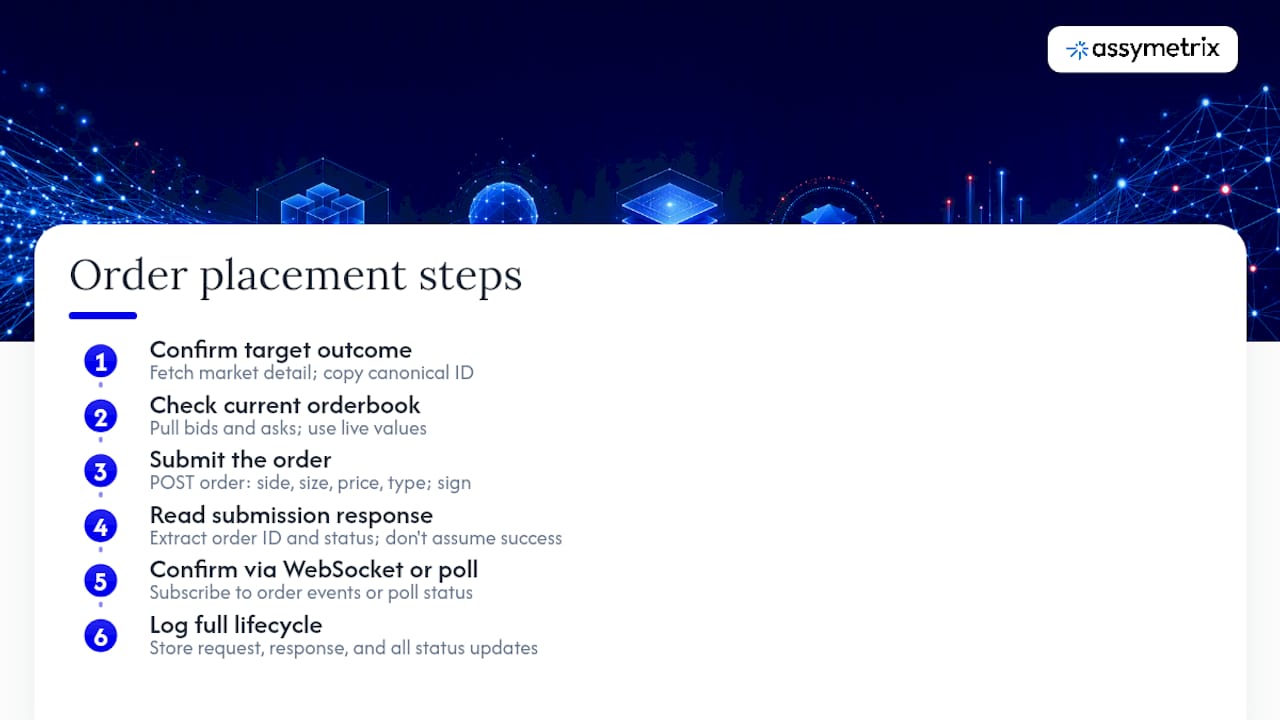
Step 1: Confirm the target outcome. Fetch market detail for the market you intend to trade and copy the exact outcomeId. Never hardcode a slug; slugs change, IDs don’t.
Step 2: Check the current orderbook. Pull bestBid and bestAsk before submitting, so your limit price reflects the live book rather than a stale cached value.
Step 3: Submit the order. A typical POST request to an orders endpoint includes outcomeId, side (buy/sell), price, size, and an orderType (limit or market), signed with your trading-scoped key.
Step 4: Read the response for an order ID and status. A successful submission returns an orderId and a status like pending or open; don’t assume success just because the HTTP call returned 200.
Step 5: Confirm via WebSocket or a follow-up REST call. Subscribe to orders@account to catch the fill or cancellation event, or poll the order status endpoint if you’re not running a live socket. This is exactly why sandbox testing of resolution handling and order lifecycle events prevents production surprises: the gap between “order accepted” and “order filled” is where most bot bugs live.
Step 6: Log the full lifecycle. Store the submission payload, the response, and every subsequent status update. When a fill doesn’t match your expected price, this log is the only way to diagnose whether it was slippage, a stale book, or a bug in your own code.
Explanation of Data Schemas and Response Formats for Key Endpoints
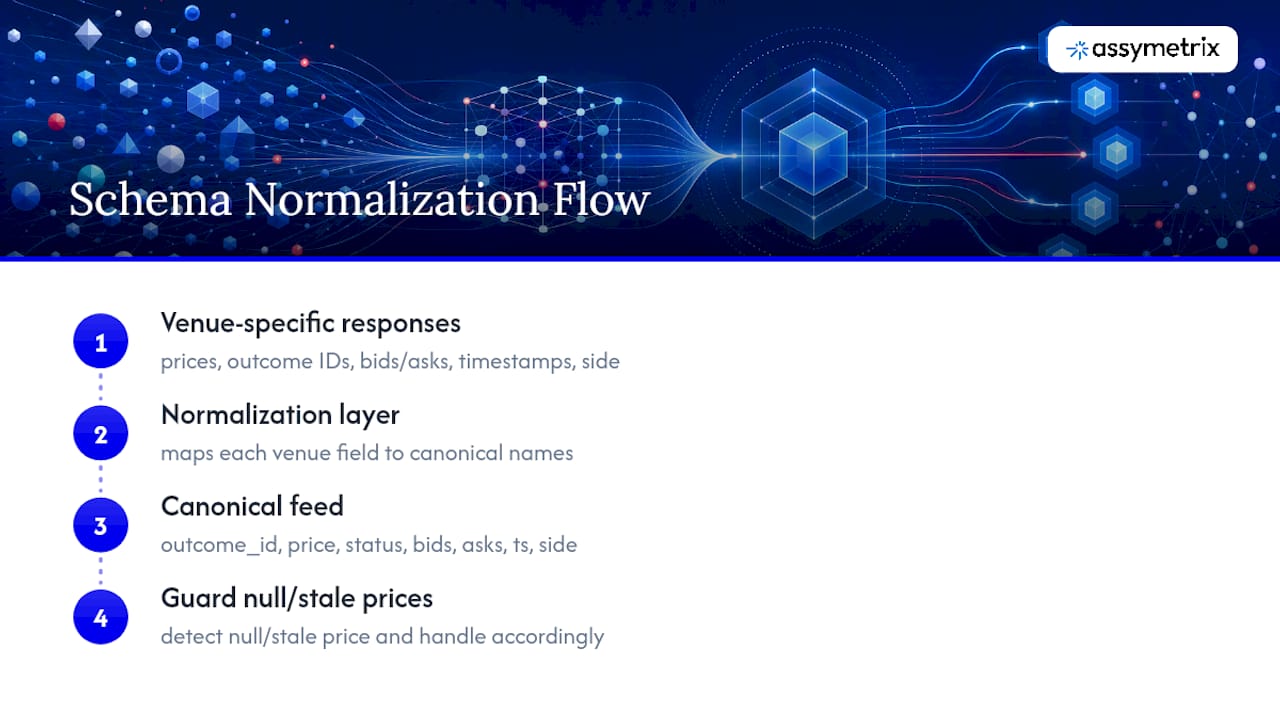
Most prediction market responses follow a JSON structure with a top-level array or object wrapping individual records, plus metadata for pagination. A markets list response typically nests an array of market objects, each carrying marketId, a title, a status enum, and an outcomes array with per-outcome IDs and current prices.
Market detail responses expand that outcomes array with full fields per outcome: outcomeId, lastPrice, bestBid, bestAsk, and a resolutionTimestamp at the market level. Orderbook responses differ structurally, returning two arrays (bids and asks) of [price, size] tuples plus a sequence number for reconciliation.
Trade history and candle endpoints both return time-ordered arrays, but candles bucket data into fixed intervals (1m, 1h, 1d) with open, high, low, close, and volume fields per bucket, while raw trades return one record per execution with a timestamp, price, size, and side.
The single most common schema mistake is treating price fields as always populated. A market awaiting resolution can return a null or stale lastPrice on some venues, so guard your parsing logic accordingly. Field names also drift slightly across venues before normalization: one exchange’s bestBid might be another’s topBid. This is precisely the mismatch a normalized schema is built to eliminate, since a unified feed maps every venue’s fields to the same canonical names before your code ever sees the response.
Security Best Practices for Storing and Using API Keys in Apps
Treat every prediction market API key the way you’d treat a database credential, because a trading-scoped key can move real money if it leaks.
Never commit keys to source control, even in a private repository. Use environment variables or a secrets manager (AWS Secrets Manager, HashiCorp Vault, or your platform’s equivalent) and load them at runtime. For client-side or mobile applications, never embed a trading key directly in the app bundle; route trading actions through a backend service you control, and expose only read-only, rate-limited endpoints to the client.
Scope keys tightly. If your application only reads market data, generate a read-only key rather than reusing a trading-enabled credential out of convenience. Most providers let you generate multiple keys with different permission levels, and a compromised read-only key is a far smaller incident than a compromised trading key.
Rotate keys on a schedule, not just after a suspected leak, and revoke unused keys immediately when a project ends or a team member leaves. Log key usage where the provider supports it, so an unexpected spike in request volume from a given key surfaces before it becomes a rate-limit ban or a security incident.
If you’re running a bot in production, keep trading keys and monitoring/read keys separate entirely. A dashboard that only needs to display prices has no business holding a key capable of placing orders.
Troubleshooting Tips for Common API Connection Failures
Connection failures usually fall into a handful of repeatable categories, and diagnosing which one you’re facing takes seconds once you know what to check.
A 401 Unauthorized almost always means a missing, expired, or malformed auth header. Double-check the exact header name the provider expects. A 403 Forbidden typical means your key is valid but lacks the permission scope for that specific endpoint, which is common when a read-only key hits a trading route.
A 429 Too Many Requests means you’ve hit a rate limit. Check the response headers for a Retry-After value and back off accordingly rather than retrying immediately, which can extend the throttle window.
WebSocket connections that drop immediately after connecting almost always trace back to an auth handshake failure: a malformed nonce, an expired timestamp, or a key that isn’t scoped for the channel you’re subscribing to. If the connection stays open but you stop receiving messages, check for a missed heartbeat or ping/pong requirement; many providers close idle sockets that don’t respond to periodic pings.
Intermittent 500-series errors that resolve on retry usually indicate a provider-side issue rather than a bug in your code, so build retry logic with backoff for these specifically, separate from your 429 handling.
Guidance on Environment Setup Including SDKs or Dependencies Needed
Getting your local environment ready takes less time than most developers expect. For REST integration, any modern HTTP client works: requests in Python, axios or the native fetch API in JavaScript, or curl for quick manual testing.
For WebSocket connections, Python developers typically reach for websockets or websocket-client, while JavaScript developers use the native WebSocket API in browsers or the ws package in Node.js. If you need HMAC signing for authenticated WebSocket connections, Python’s built-in hmac and hashlib modules cover it without extra dependencies; JavaScript can use Node’s native crypto module.
For research pipelines pulling historical candles or bulk exports, pandas is the standard choice for wrangling time-series data in Python, and a lightweight time-series database (TimescaleDB or InfluxDB) helps if you’re storing normalized events long-term rather than just running a one-off backtest.
Set your API key as an environment variable (ASSYMETRIX_API_KEY or similar) rather than a config file checked into version control. A .env file loaded with a library like python-dotenv or Node’s dotenv keeps local development simple while staying out of your repository entirely.
How to Handle Authentication Errors and Refresh Tokens
Most prediction market APIs use long-lived API keys rather than short-lived OAuth tokens, which simplifies auth but raises the stakes if a key is ever compromised since there’s no automatic expiration to limit the damage.
Where a provider does implement token-based auth with expiration, build a refresh flow that runs proactively, not reactively. Track your token’s issued time and expiration window, and refresh it a few minutes before expiry rather than waiting for a 401 to trigger the refresh. Waiting for the error means every expired-token event costs you at least one failed request in production.
For static API keys, “handling authentication errors” mostly means distinguishing between a genuinely invalid key (which needs manual regeneration on the provider dashboard) and a temporary permissions issue (which might mean your key needs a different scope for the endpoint you’re calling). Log the specific error message the API returns rather than just the status code. A 401 with a message like “key expired” versus “invalid signature” points to two completely different fixes, and swallowing that detail in generic error handling will cost you debugging time later.
Author’s Perspective: Build vs. Buy for Prediction Market Data
Building your own venue adapters makes sense when you need a proprietary settlement flow or a vendor-specific feature no aggregator exposes yet. For most other cases, especially AI agents, arbitrage detection, and large backtests, a unified feed pays for itself the first time you’d otherwise be reconciling three different schemas by hand. Before committing to either path, check the vendor’s SLA, historical depth, canonical ID support, and SDK coverage.
— Dean
Try the Assymetrix Data API for Unified Cross-Venue Feeds
Building separate integrations for Polymarket, Kalshi, and Limitless means maintaining three schemas, three rate-limit policies, and three ID formats that never quite match. Some services collapse all of it into one API call, backed by a large volume of historical data spanning many rows of trading activity across venues.
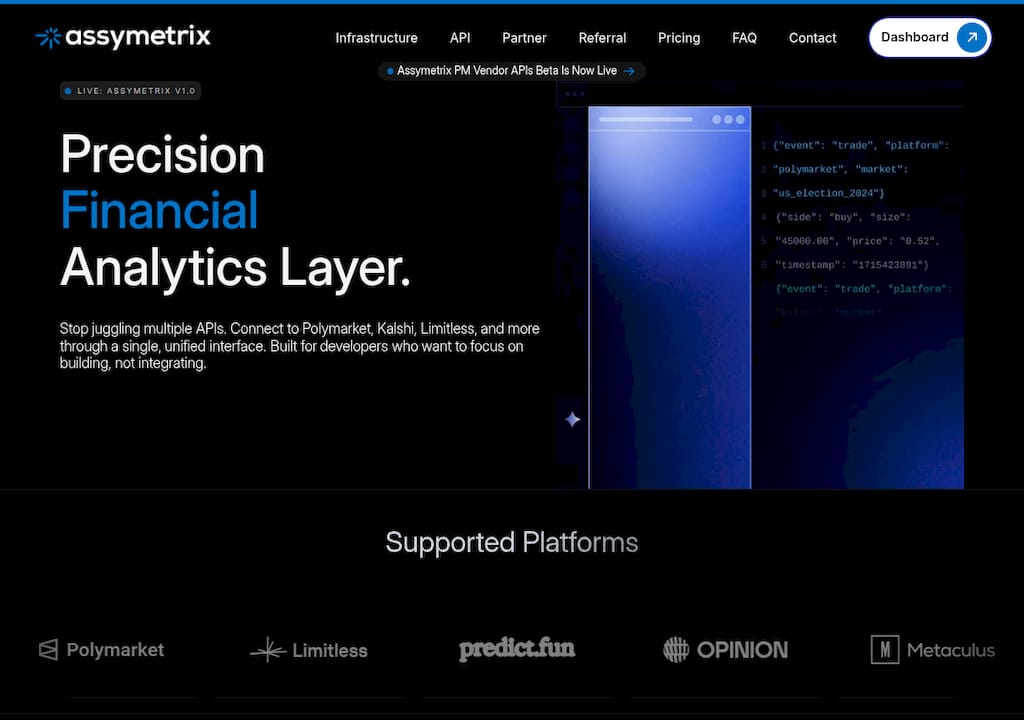
The Assymetrix Data API gives you canonical IDs, a consistent schema, and derived signals like Smart Money wallet tracking and cross-venue arbitrage detection without writing a separate adapter for each exchange. Pricing details for these APIs are available directly on the product pages rather than published here, so check current terms before committing to a tier.
If you’re building a bot, a research pipeline, or an AI agent that needs live and historical prediction market data without the maintenance overhead of three separate integrations, start by requesting an API key and running the first REST call against the markets endpoint. From there, the WebSocket quickstart walks you through subscribing to live price deltas using the same canonical IDs you just pulled.
Primary Docs and Reference Links
For deeper technical reference beyond this quick start, these resources cover the specifics developers ask about most:
Assymetrix Data API guide for full endpoint schemas and authentication details
Assymetrix WebSocket API guide for connection and reconnection patterns
ccxt’s prediction markets wiki for outcome-addressed client library patterns
Backtesting guide using historical snapshots for research pipeline setups
Sources
FAQ
What Do I Need to Start Using a Prediction Market API?
You need an API key from the provider’s dashboard, the base URL and docs, and a REST client to make your first call against a markets or events endpoint.
Do I Need WebSocket, or Is REST Enough?
REST is enough for research pipelines and dashboards that don’t need sub-second updates; bots and live UIs tracking fills or fast-moving prices need WebSocket for push-based delta updates.
Why Does My WebSocket Connection Keep Rejecting?
The most common cause is a malformed or improperly signed nonce, since trading-scoped WebSocket connections typically require a time-based nonce signed with your API secret on every handshake.
How Does Assymetrix Differ From a Single-Venue API?
Some providers normalize data across multiple venues under one schema with canonical IDs, so you integrate once instead of building separate adapters for each venue’s format.
What’s the Biggest Mistake First-Time Integrators Make?
Ignoring pagination and rate limits, and computing profit or loss before a market’s resolution state actually confirms settlement.
Ship in 10 Minutes: Prediction Market API for Devs with Canonical IDs
You can authenticate, list live markets, and start streaming prices within minutes using a Prediction Market API. The minimal path runs through three steps: request an API key, make a REST call against a markets endpoint to pull canonical market and outcome IDs, then open a WebSocket subscription for live price updates. Some providers standardize this flow across venues so the same integration code works whether the underlying market lives on Polymarket, Kalshi, or Limitless.
TL;DR:
Integration speed is crucial, with the fastest path involving API key registration, a REST call for market data, and a WebSocket subscription within ten minutes.
Proper WebSocket authentication relies on precise nonce signing and signing payloads, with connection drops often caused by incorrect signing or expired timestamps.
Handling pagination tokens, rate limits, and schema validation early prevents silent failures and data inconsistencies during production deployment.
Using normalized schemas and canonical IDs across venues like Polymarket, Kalshi, and Limitless simplifies cross-venue arbitrage and reduces engineering overhead.
Storing only finalized market resolution data and respecting rate limits guards against common incidents and helps maintain reliable, clean data streams.
Assymetrixassymetrix.comBuild Across Markets FasterAssymetrix gives developers one integration for structured prediction market data across Polymarket, Kalshi, and Limitless.Explore Assymetrix
Table of Contents
Quick Start Checklist: The First 10 Minutes
Prerequisites and Authentication: API Keys, Headers, and Nonce Signing
Core Endpoints Every Prediction Market App Needs
First REST Call: Minimal curl Example and How to Read the Response
WebSocket Quick Start: Authentication, Subscriptions, and Reconciling Orderbook Deltas
Choosing REST vs. WebSocket: Patterns for Bots, Dashboards, and Research Pipelines
Common Integration Mistakes and Defensive Best Practices
How Assymetrix Accelerates Integrations: Cross-Venue Normalization and Developer Resources
Step-by-Step Example of Placing a Test Order via the API
Explanation of Data Schemas and Response Formats for Key Endpoints
Security Best Practices for Storing and Using API Keys in Apps
Troubleshooting Tips for Common API Connection Failures
Guidance on Environment Setup Including SDKs or Dependencies Needed
How to Handle Authentication Errors and Refresh Tokens
Author’s Perspective: Build vs. Buy for Prediction Market Data
Try the Assymetrix Data API for Unified Cross-Venue Feeds
Primary Docs and Reference Links
Sources
Quick Start Checklist: The First 10 Minutes
Every working integration follows the same sequence, whether you’re building a research script or a production trading bot. Here’s the fastest path from zero to a live feed.
Sign up and grab an API key. Register on the provider’s dashboard and generate a key scoped to your use case (read-only for research, trading-enabled for bots).
Find the base URL and docs. Bookmark the API reference before you write a single line of code; endpoint names and required headers vary just enough between providers to cause silent failures.
Run your first REST GET. Call the active markets or events endpoint and confirm you can see outcome IDs, prices, and status fields in the response.
Subscribe to a price channel. Open a WebSocket connection and subscribe to a ticker or orderbook channel for one market to confirm you’re getting push updates, not just a static snapshot.
Check resolution handling. Verify how the API signals when a market settles, and add basic reconnect logic so a dropped socket doesn’t silently stop your feed.
Pull historical candles if you need backtests. Request an OHLCV or bulk export endpoint to confirm historical depth before you commit to a data source for research.
If you can complete steps one through four in under ten minutes, the API is production-viable. If step three requires trial-and-error guessing at field names, expect a longer integration cycle than the docs promise.
Prerequisites and Authentication: API Keys, Headers, and Nonce Signing
Most prediction market APIs split access into two tiers: public discovery endpoints that need no credentials, and trading or account endpoints that require a scoped key. Market listings and public trade history are frequently open, while placing orders or reading wallet balances requires authentication headers on every request.
Typical header patterns look like this:
x-api-key: <your_key>for simple key-based auth on REST callsAuthorization: Bearer <token>for OAuth-style or session-based flowsA signed payload combining a timestamp, your API secret, and the request body for trading actions
WebSocket authentication is where most developers lose time. Trading-scoped connections commonly require signing a time-based nonce with your API secret, and the key itself typically needs to be account-scoped rather than a general read key. Get the nonce format wrong, and the handshake rejects instantly with little explanation in the error payload.
Rate limits usually surface in response headers (X-RateLimit-Remaining, Retry-After) rather than in the docs prose, so check headers programmatically instead of hardcoding assumed thresholds. Use sandbox credentials where available to test the full auth handshake before touching real trading logic.
Pro Tip: Write a standalone unit test that only checks your WebSocket auth handshake, separate from your trading logic. Isolating that failure point saves hours when a nonce format changes.
Core Endpoints Every Prediction Market App Needs
Almost every application, whether it’s a dashboard, a bot, or a research pipeline, touches the same handful of endpoints. Knowing what fields to read from each one determines how clean your data model turns out.
Markets/events list: filter by status (active, closed, resolved) and category; use this to populate discovery UIs and get your first batch of canonical IDs.
Market detail: returns the outcomes array, resolution timestamp, and the canonical outcome ID or handle you’ll reference in every subsequent call. Prediction exchanges typically address outcomes by ID or handle rather than a ticker symbol, which trips up developers coming from traditional market data feeds.
Orderbook: exposes
bestBid,bestAsk, depth levels, and a sequence number you’ll need to detect dropped or out-of-order messages.Trades: a public trade stream plus historical trade records, useful for volume calculations and execution analysis.
Candles/OHLCV: request specific timeframes and watch documented limits on backfill depth. This is the endpoint research pipelines depend on most.
Positions/wallet activity: balances and open positions, exposed only on authenticated endpoints.
Canonicalize five fields early in your data model: marketId, outcomeId, lastPrice, liquidity, and volume. Every downstream feature, from a simple price chart to an arbitrage detector, builds on those five values staying consistent across venues.
First REST Call: Minimal curl Example and How to Read the Response
A minimal request for active markets looks like this:
curl -X GET "https://data.assymetrix.com/api/v1/markets?status=active&limit=10" \
  -H "x-api-key: YOUR_API_KEY"
The response array gives you marketId, outcomeId, lastPrice, and a status field per market. Grab an outcomeId from that first response and use it to fetch market detail next, which returns the full outcomes array and resolution timestamp you’ll need before displaying anything to a user.
Watch for these three things before you trust the response in production:
Pagination tokens. Most markets endpoints return a
nextCursororpagetoken rather than dumping every market in one call. Missing this means your app silently shows only the first page forever.HTTP status codes. A
401or403usually means a missing or malformed auth header; a429means you’ve hit a rate limit and should back off, not retry immediately; anything in the500range means the provider is having issues, not you.Schema assertions. Before wiring a response into production code, assert that
outcomeId,lastPrice, andstatusare present and typed as expected. APIs occasionally return null prices for markets awaiting settlement, and an unguarded numeric parse will throw.
WebSocket Quick Start: Authentication, Subscriptions, and Reconciling Orderbook Deltas
REST calls give you a snapshot. WebSocket gives you the push updates that bots and live dashboards actually need, without the latency and rate-limit cost of polling every few seconds.
The typical auth pattern requires three inputs from you: a nonce (usually a timestamp or incrementing counter), the payload you’re signing, and an HMAC signature generated from your API secret. Get any one of those wrong and the connection drops before you receive a single message.
Once connected, subscribe to the channels your application actually uses:
tickerorpricefor last-trade updatesorderbookfor incremental bid/ask deltasorders@accountfor your own order status changesbalances@accountfor wallet updates on trading-enabled keys
Every orderbook delta message carries a sequence number. Track it, and if you detect a gap, request a fresh snapshot rather than trusting the delta stream has caught you up. This single reconciliation habit is what separates a bot that quietly trades on stale data from one that doesn’t.
Pro Tip: Build your reconnect logic with exponential backoff from the start, not as an afterthought. A hard reconnect loop that retries every second is how developers accidentally get their API key throttled or suspended.
Choosing REST vs. WebSocket: Patterns for Bots, Dashboards, and Research Pipelines
The right transport depends entirely on what your application does with the data, not just what’s available.
Bots need WebSocket for live orderbook and fill data, but should still confirm order state with a REST call after submission. Relying on socket messages alone for order confirmation risks acting on a message that never arrives.
Dashboards typically split the load: REST for market discovery and static detail pages, WebSocket for incremental price updates once a market is open on screen. Debounce fast-moving price updates before repainting the UI, or you’ll burn CPU on updates nobody can read anyway.
Research pipelines rarely need a live socket at all. Bulk historical exports and candle endpoints over REST cover most backtesting needs, and high-fidelity historical data is what makes advanced features like trader scoring possible in the first place.
AI agents benefit from a hybrid: an initial REST load for full market state, then WebSocket deltas layered on top, with compressed world-state snapshots reducing both latency and token cost compared to polling every market endpoint individually.
Store canonicalized events in a time-series database regardless of which transport feeds them. That decouples your analysis layer from whichever provider quirk caused a given message to arrive.
Common Integration Mistakes and Defensive Best Practices
Most production incidents in prediction market integrations trace back to a small set of repeat offenses, and all of them are preventable with a little defensive code.
Computing P&L before settlement is confirmed. Resolution state changes matter more than any price tick; wait for a confirmed settlement event before finalizing any profit calculation.
Ignoring pagination. A cursor-based response that stops after the first page will quietly cap your market coverage without throwing an error.
Retrying 429s immediately. Respect the
Retry-Afterheader and implement exponential backoff, or risk a temporary throttle turning into a longer suspension.Trusting orderbook deltas indefinitely. Reconcile against a fresh snapshot on any detected sequence gap.
Hardcoding market slugs. Slugs and display names get renamed; keep a mapping layer keyed to canonical outcome IDs instead.
Skipping data quality monitoring. Track message latency, missing sequence numbers, and out-of-order arrivals as ongoing metrics, not just launch-day checks.
Pro Tip: Log every resolution event separately from price ticks. When something goes wrong in production, you’ll want a clean audit trail of exactly when a market settled, not a price chart you have to reverse-engineer.
How Assymetrix Accelerates Integrations: Cross-Venue Normalization and Developer Resources
Building separate adapters for Polymarket, Kalshi, and Limitless means handling three different schemas, three different ID formats, and three different rate-limit regimes. Certain platforms collapse that into a single integration by normalizing market and outcome data across venues under one schema.
Canonical IDs and a unified schema cut engineering work substantially when integrating multiple venues and enable cross-venue features like arbitrage signals that a single-venue feed can’t produce on its own.
Full endpoint references and WebSocket auth patterns live in the Assymetrix API guide, covering both REST and streaming access.
Practical outcomes for developers include fewer ID-mapping tables to maintain, consistent orderbook shapes regardless of source venue, and derived features like Smart Money wallet tracking and arbitrage detection built on top of the same normalized feed.
Step-by-Step Example of Placing a Test Order via the API
Placing an order follows a predictable sequence once your auth handshake works, and testing it in a sandbox environment first avoids costly mistakes on a live book.
Step 1: Confirm the target outcome. Fetch market detail for the market you intend to trade and copy the exact outcomeId. Never hardcode a slug; slugs change, IDs don’t.
Step 2: Check the current orderbook. Pull bestBid and bestAsk before submitting, so your limit price reflects the live book rather than a stale cached value.
Step 3: Submit the order. A typical POST request to an orders endpoint includes outcomeId, side (buy/sell), price, size, and an orderType (limit or market), signed with your trading-scoped key.
Step 4: Read the response for an order ID and status. A successful submission returns an orderId and a status like pending or open; don’t assume success just because the HTTP call returned 200.
Step 5: Confirm via WebSocket or a follow-up REST call. Subscribe to orders@account to catch the fill or cancellation event, or poll the order status endpoint if you’re not running a live socket. This is exactly why sandbox testing of resolution handling and order lifecycle events prevents production surprises: the gap between “order accepted” and “order filled” is where most bot bugs live.
Step 6: Log the full lifecycle. Store the submission payload, the response, and every subsequent status update. When a fill doesn’t match your expected price, this log is the only way to diagnose whether it was slippage, a stale book, or a bug in your own code.
Explanation of Data Schemas and Response Formats for Key Endpoints
Most prediction market responses follow a JSON structure with a top-level array or object wrapping individual records, plus metadata for pagination. A markets list response typically nests an array of market objects, each carrying marketId, a title, a status enum, and an outcomes array with per-outcome IDs and current prices.
Market detail responses expand that outcomes array with full fields per outcome: outcomeId, lastPrice, bestBid, bestAsk, and a resolutionTimestamp at the market level. Orderbook responses differ structurally, returning two arrays (bids and asks) of [price, size] tuples plus a sequence number for reconciliation.
Trade history and candle endpoints both return time-ordered arrays, but candles bucket data into fixed intervals (1m, 1h, 1d) with open, high, low, close, and volume fields per bucket, while raw trades return one record per execution with a timestamp, price, size, and side.
The single most common schema mistake is treating price fields as always populated. A market awaiting resolution can return a null or stale lastPrice on some venues, so guard your parsing logic accordingly. Field names also drift slightly across venues before normalization: one exchange’s bestBid might be another’s topBid. This is precisely the mismatch a normalized schema is built to eliminate, since a unified feed maps every venue’s fields to the same canonical names before your code ever sees the response.
Security Best Practices for Storing and Using API Keys in Apps
Treat every prediction market API key the way you’d treat a database credential, because a trading-scoped key can move real money if it leaks.
Never commit keys to source control, even in a private repository. Use environment variables or a secrets manager (AWS Secrets Manager, HashiCorp Vault, or your platform’s equivalent) and load them at runtime. For client-side or mobile applications, never embed a trading key directly in the app bundle; route trading actions through a backend service you control, and expose only read-only, rate-limited endpoints to the client.
Scope keys tightly. If your application only reads market data, generate a read-only key rather than reusing a trading-enabled credential out of convenience. Most providers let you generate multiple keys with different permission levels, and a compromised read-only key is a far smaller incident than a compromised trading key.
Rotate keys on a schedule, not just after a suspected leak, and revoke unused keys immediately when a project ends or a team member leaves. Log key usage where the provider supports it, so an unexpected spike in request volume from a given key surfaces before it becomes a rate-limit ban or a security incident.
If you’re running a bot in production, keep trading keys and monitoring/read keys separate entirely. A dashboard that only needs to display prices has no business holding a key capable of placing orders.
Troubleshooting Tips for Common API Connection Failures
Connection failures usually fall into a handful of repeatable categories, and diagnosing which one you’re facing takes seconds once you know what to check.
A 401 Unauthorized almost always means a missing, expired, or malformed auth header. Double-check the exact header name the provider expects. A 403 Forbidden typical means your key is valid but lacks the permission scope for that specific endpoint, which is common when a read-only key hits a trading route.
A 429 Too Many Requests means you’ve hit a rate limit. Check the response headers for a Retry-After value and back off accordingly rather than retrying immediately, which can extend the throttle window.
WebSocket connections that drop immediately after connecting almost always trace back to an auth handshake failure: a malformed nonce, an expired timestamp, or a key that isn’t scoped for the channel you’re subscribing to. If the connection stays open but you stop receiving messages, check for a missed heartbeat or ping/pong requirement; many providers close idle sockets that don’t respond to periodic pings.
Intermittent 500-series errors that resolve on retry usually indicate a provider-side issue rather than a bug in your code, so build retry logic with backoff for these specifically, separate from your 429 handling.
Guidance on Environment Setup Including SDKs or Dependencies Needed
Getting your local environment ready takes less time than most developers expect. For REST integration, any modern HTTP client works: requests in Python, axios or the native fetch API in JavaScript, or curl for quick manual testing.
For WebSocket connections, Python developers typically reach for websockets or websocket-client, while JavaScript developers use the native WebSocket API in browsers or the ws package in Node.js. If you need HMAC signing for authenticated WebSocket connections, Python’s built-in hmac and hashlib modules cover it without extra dependencies; JavaScript can use Node’s native crypto module.
For research pipelines pulling historical candles or bulk exports, pandas is the standard choice for wrangling time-series data in Python, and a lightweight time-series database (TimescaleDB or InfluxDB) helps if you’re storing normalized events long-term rather than just running a one-off backtest.
Set your API key as an environment variable (ASSYMETRIX_API_KEY or similar) rather than a config file checked into version control. A .env file loaded with a library like python-dotenv or Node’s dotenv keeps local development simple while staying out of your repository entirely.
How to Handle Authentication Errors and Refresh Tokens
Most prediction market APIs use long-lived API keys rather than short-lived OAuth tokens, which simplifies auth but raises the stakes if a key is ever compromised since there’s no automatic expiration to limit the damage.
Where a provider does implement token-based auth with expiration, build a refresh flow that runs proactively, not reactively. Track your token’s issued time and expiration window, and refresh it a few minutes before expiry rather than waiting for a 401 to trigger the refresh. Waiting for the error means every expired-token event costs you at least one failed request in production.
For static API keys, “handling authentication errors” mostly means distinguishing between a genuinely invalid key (which needs manual regeneration on the provider dashboard) and a temporary permissions issue (which might mean your key needs a different scope for the endpoint you’re calling). Log the specific error message the API returns rather than just the status code. A 401 with a message like “key expired” versus “invalid signature” points to two completely different fixes, and swallowing that detail in generic error handling will cost you debugging time later.
Author’s Perspective: Build vs. Buy for Prediction Market Data
Building your own venue adapters makes sense when you need a proprietary settlement flow or a vendor-specific feature no aggregator exposes yet. For most other cases, especially AI agents, arbitrage detection, and large backtests, a unified feed pays for itself the first time you’d otherwise be reconciling three different schemas by hand. Before committing to either path, check the vendor’s SLA, historical depth, canonical ID support, and SDK coverage.
— Dean
Try the Assymetrix Data API for Unified Cross-Venue Feeds
Building separate integrations for Polymarket, Kalshi, and Limitless means maintaining three schemas, three rate-limit policies, and three ID formats that never quite match. Some services collapse all of it into one API call, backed by a large volume of historical data spanning many rows of trading activity across venues.
The Assymetrix Data API gives you canonical IDs, a consistent schema, and derived signals like Smart Money wallet tracking and cross-venue arbitrage detection without writing a separate adapter for each exchange. Pricing details for these APIs are available directly on the product pages rather than published here, so check current terms before committing to a tier.
If you’re building a bot, a research pipeline, or an AI agent that needs live and historical prediction market data without the maintenance overhead of three separate integrations, start by requesting an API key and running the first REST call against the markets endpoint. From there, the WebSocket quickstart walks you through subscribing to live price deltas using the same canonical IDs you just pulled.
Primary Docs and Reference Links
For deeper technical reference beyond this quick start, these resources cover the specifics developers ask about most:
Assymetrix Data API guide for full endpoint schemas and authentication details
Assymetrix WebSocket API guide for connection and reconnection patterns
ccxt’s prediction markets wiki for outcome-addressed client library patterns
Backtesting guide using historical snapshots for research pipeline setups
Sources
FAQ
What Do I Need to Start Using a Prediction Market API?
You need an API key from the provider’s dashboard, the base URL and docs, and a REST client to make your first call against a markets or events endpoint.
Do I Need WebSocket, or Is REST Enough?
REST is enough for research pipelines and dashboards that don’t need sub-second updates; bots and live UIs tracking fills or fast-moving prices need WebSocket for push-based delta updates.
Why Does My WebSocket Connection Keep Rejecting?
The most common cause is a malformed or improperly signed nonce, since trading-scoped WebSocket connections typically require a time-based nonce signed with your API secret on every handshake.
How Does Assymetrix Differ From a Single-Venue API?
Some providers normalize data across multiple venues under one schema with canonical IDs, so you integrate once instead of building separate adapters for each venue’s format.
What’s the Biggest Mistake First-Time Integrators Make?
Ignoring pagination and rate limits, and computing profit or loss before a market’s resolution state actually confirms settlement.
Other Blog


