Kalshi API Tutorial: Real-Time Event Market Data
Kalshi API Tutorial: Real-Time Event Market Data
Kalshi API Tutorial: Real-Time Event Market Data
Master the Kalshi API Tutorial. Accessing Real-Time Event Market Data is easy with one unified endpoint. Get started today!

Kalshi API Tutorial: Real-Time Event Market Data
TL;DR:
The Assymetrix Data API provides a unified, normalized endpoint for real-time and historical Kalshi market data. It simplifies integration by serving venue-neutral schemas for trades, orderbooks, and events, reducing engineering overhead. The API supports both live streaming and bulk exports, enabling efficient strategy development and backtesting.
The fastest path to normalized, real-time Kalshi event and market data is a single unified endpoint: the Assymetrix Data API. One integration delivers Kalshi markets, orderbooks, trades, events, settlements, and series alongside Polymarket and Limitless, all normalized into a venue-neutral schema. No per-venue auth juggling, no schema-drift tax.
To start immediately:
Register for an API key at data.assymetrix.com
Test the
/marketsdiscovery endpoint in the developer playgroundRun the Python quickstart in the code section below
Assymetrix indexes a substantial volume of structured prediction market data spanning a large number of rows of trading activity across Kalshi, Polymarket, and Limitless.
Table of Contents
How does the Assymetrix unified Data API expose Kalshi data?
What fields does the canonical schema return for Kalshi markets?
Which endpoints do you call for real-time Kalshi event data?
Python quickstart: stream live Kalshi market data via Assymetrix
Authentication, rate limits, and connection best practices
How do you handle market lifecycle states in production?
How do you build a research-ready historical Kalshi dataset?
Production hardening: what does a reliable Kalshi data feed require?
Common pitfalls and how to fix them fast
Key Takeaways
What engineering teams actually do with unified Kalshi data
One endpoint for Kalshi, Polymarket, and Limitless data
Useful sources and further reading
How does the Assymetrix unified Data API expose Kalshi data?
One read-only API surface delivers Kalshi data normalized into a venue-neutral schema. Assymetrix ingests raw Kalshi REST and WebSocket feeds, runs them through an indexer and normalizer, then serves a canonical view through its own REST and streaming endpoints.
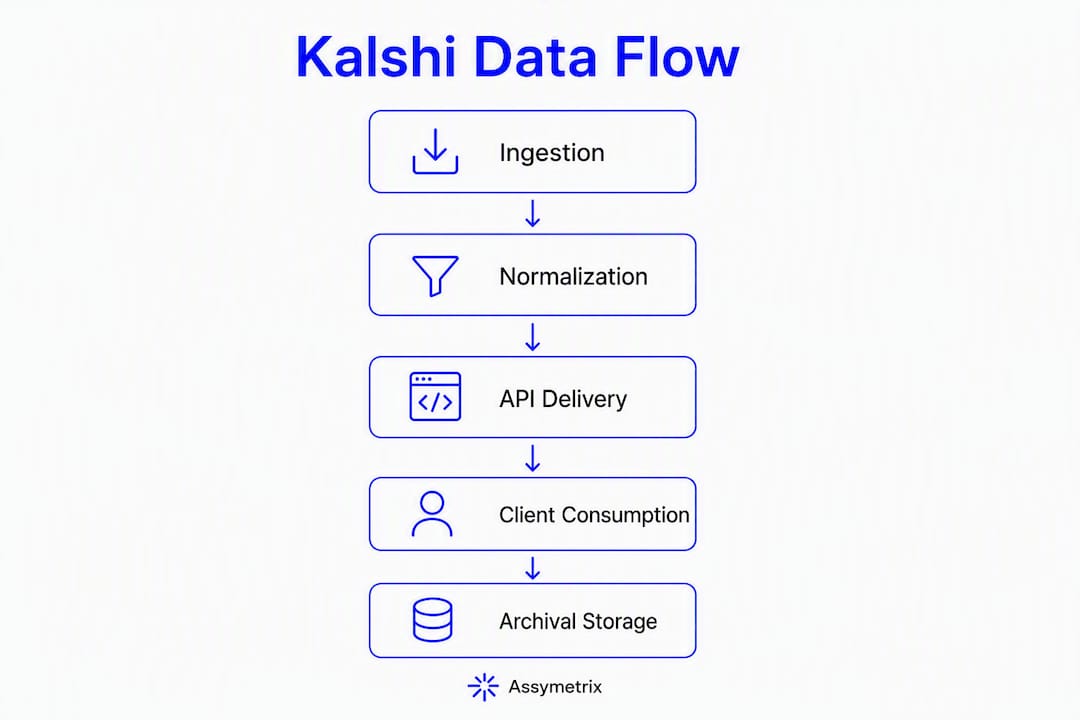
The ingestion pipeline looks like this: Kalshi REST + WebSocket feeds feed an indexer that produces canonical schema records, which are stored and served through the Assymetrix REST API, streaming endpoint, and developer playground. Client code never touches venue-specific wire formats.
Kalshi’s API is REST-based with WebSocket support and uses centralized orderbook semantics, which differs structurally from on-chain venues that require parsing blockchain event logs. Normalizing both into one schema is non-trivial. Assymetrix handles that translation server-side, so your downstream code stays venue-agnostic.
With monthly prediction market trading volume now exceeding $23 billion, the engineering cost of maintaining bespoke per-venue integrations has become the primary bottleneck for institutional adoption. A unified canonical layer shortens the research-to-production cycle measurably.
Layer | What happens |
|---|---|
Ingestion | Kalshi REST polling + WebSocket stream consumed continuously |
Normalization | Venue fields mapped to canonical schema; price formats converted to float probability |
Storage | Indexed in time-series and columnar stores; historical archive pre-built |
API surface | REST endpoints + streaming (SSE/WebSocket); developer playground |
Pro Tip: Use the developer playground to inspect canonical field names before writing any storage schema. Locking your database columns to canonical names now prevents a painful migration later.
What fields does the canonical schema return for Kalshi markets?
The canonical schema returns stable field names for markets, outcomes, ticks, trades, orderbook snapshots, events, and settlements. Your downstream code references market_id and last_trade_price regardless of whether the source is Kalshi or any other covered venue.
Canonical field | Example value (Kalshi source) | Notes |
|---|---|---|
|
| Stable across venue updates |
|
| Raw Kalshi ticker preserved |
|
| YES/NO mapped to binary |
| — | ISO 8601 UTC |
| — | ISO 8601 UTC |
|
| Float probability (0–1) |
| — | Float probability |
| — | Float probability |
volume | — | Contracts |
|
|
|
Kalshi prices arrive as USD strings in a 0–1 range (_dollars fields). Assymetrix converts these server-side to a float probability, so cross-venue strategies run against a consistent numeric format without per-venue conversion logic in your models.
Resolution rules and settlement metadata are preserved in contract-level metadata fields. Indexing at scale revealed systematic resolution-rule mismatches across venues, which is why canonical metadata must carry venue-specific resolution logic rather than assuming a universal settlement model.
settlement_price: final resolved probability (0.0 or 1.0 for binary)resolution_source: venue-level rule string preserved verbatimliquidity_quality_score: spread and trader-concentration metric, not raw volume
Which endpoints do you call for real-time Kalshi event data?
The unified API covers discovery, snapshots, trades, time-series, events, and bulk archive exports. All responses use the canonical schema.
Endpoint | Method | Purpose |
|---|---|---|
| GET | Discovery; filter by venue, status, event type |
| GET | Current orderbook snapshot |
| GET / stream | Trade history or live trade stream |
| GET | OHLC candles / price series |
| POST | Historical backfill; returns manifest + download URLs |
| WebSocket / SSE | Real-time market, trade, and event updates |
A minimal REST discovery request:
GET https://data.assymetrix.com/v1/markets?venue=kalshi&status=open
Authorization: Bearer YOUR_API_KEY
GET https://data.assymetrix.com/v1/markets?venue=kalshi&status=open
Authorization: Bearer YOUR_API_KEY
Response excerpt:
{
  "markets": [
    {
      "market_id": "asy_klsh_INXD-23DEC31-B4500",
      "venue_market_ticker": "INXD-23DEC31-B4500",
      "last_trade_price": 0.62,
      "settlement_status": "open"
    }
  ],
  "cursor": "eyJvZmZzZXQiOjEwMH0="
}
{
  "markets": [
    {
      "market_id": "asy_klsh_INXD-23DEC31-B4500",
      "venue_market_ticker": "INXD-23DEC31-B4500",
      "last_trade_price": 0.62,
      "settlement_status": "open"
    }
  ],
  "cursor": "eyJvZmZzZXQiOjEwMH0="
}
Pagination uses opaque cursor tokens. Pass cursor from the previous response as a query parameter to advance. For streaming, the WebSocket channel pushes incremental updates; expect sub-second update cadence for active Kalshi markets during high-volume periods.
The unified API is read-only by design. Order execution stays on the venue. This means your ingestion pipeline carries no execution risk and requires only a data-tier API key, not trading credentials.
Assymetrix provides a developer playground where you can test every endpoint against live data before writing a line of production code.
Python quickstart: stream live Kalshi market data via Assymetrix
One script handles REST discovery, WebSocket subscription, reconnect logic, and normalized output. Copy, set your key, and run.

import os, json, time, websocket, requests

API_KEY = os.environ["ASSYMETRIX_API_KEY"]
BASE_URL = "https://data.assymetrix.com/v1"
WS_URL  = "wss://data.assymetrix.com/v1/stream"
HEADERS = {"Authorization": f"Bearer {API_KEY}"}

# 1. Discover open Kalshi markets
resp = requests.get(f"{BASE_URL}/markets",
                    params={"venue": "kalshi", "status": "open"},
                    headers=HEADERS)
markets = resp.json()["markets"]
market_ids = [m["market_id"] for m in markets[:5]]
print(f"Subscribing to {len(market_ids)} markets")

# 2. Stream trades and orderbook updates
def on_message(ws, raw):
    msg = json.loads(raw)
    with open("kalshi_feed.ndjson", "a") as f:
        f.write(json.dumps(msg) + "
")
    print(msg)

def on_error(ws, err):
    print(f"Error: {err}")

def on_open(ws):
    ws.send(json.dumps({
        "action": "subscribe",
        "channels": ["trades", "orderbook"],
        "market_ids": market_ids
    }))

# 3. Reconnect with exponential backoff + jitter
def connect(attempt=0):
    delay = min(2 ** attempt + (time.time() % 1), 60)
    if attempt > 0:
        time.sleep(delay)
    ws = websocket.WebSocketApp(
        WS_URL,
        header=[f"Authorization: Bearer {API_KEY}"],
        on_open=on_open,
        on_message=on_message,
        on_error=on_error,
        on_close=lambda ws, c, m: connect(attempt + 1)
    )
    ws.run_forever()

connect()
import os, json, time, websocket, requests

API_KEY = os.environ["ASSYMETRIX_API_KEY"]
BASE_URL = "https://data.assymetrix.com/v1"
WS_URL  = "wss://data.assymetrix.com/v1/stream"
HEADERS = {"Authorization": f"Bearer {API_KEY}"}

# 1. Discover open Kalshi markets
resp = requests.get(f"{BASE_URL}/markets",
                    params={"venue": "kalshi", "status": "open"},
                    headers=HEADERS)
markets = resp.json()["markets"]
market_ids = [m["market_id"] for m in markets[:5]]
print(f"Subscribing to {len(market_ids)} markets")

# 2. Stream trades and orderbook updates
def on_message(ws, raw):
    msg = json.loads(raw)
    with open("kalshi_feed.ndjson", "a") as f:
        f.write(json.dumps(msg) + "
")
    print(msg)

def on_error(ws, err):
    print(f"Error: {err}")

def on_open(ws):
    ws.send(json.dumps({
        "action": "subscribe",
        "channels": ["trades", "orderbook"],
        "market_ids": market_ids
    }))

# 3. Reconnect with exponential backoff + jitter
def connect(attempt=0):
    delay = min(2 ** attempt + (time.time() % 1), 60)
    if attempt > 0:
        time.sleep(delay)
    ws = websocket.WebSocketApp(
        WS_URL,
        header=[f"Authorization: Bearer {API_KEY}"],
        on_open=on_open,
        on_message=on_message,
        on_error=on_error,
        on_close=lambda ws, c, m: connect(attempt + 1)
    )
    ws.run_forever()

connect()
Expected output (normalized trade record):
{
  "type": "trade",
  "market_id": "asy_klsh_INXD-23DEC31-B4500",
  "price": 0.62,
  "size": 500,
  "side": "yes",
  "ts": "2026-05-15T14:23:01.412Z"
}
{
  "type": "trade",
  "market_id": "asy_klsh_INXD-23DEC31-B4500",
  "price": 0.62,
  "size": 500,
  "side": "yes",
  "ts": "2026-05-15T14:23:01.412Z"
}
Set
ASSYMETRIX_API_KEYin your environment before running.The
on_closecallback re-invokesconnectwith an incremented attempt counter, producing exponential backoff capped at 60 seconds.Each normalized message appends to
kalshi_feed.ndjsonfor local replay or downstream ingestion.Swap the file write for a Kafka producer call to route messages into a durable queue.
Pro Tip: Checkpoint the last ts value you successfully processed to a durable store (Redis, Postgres). On reconnect, request a backfill from that timestamp before resuming the stream so you never have a gap in your orderbook state.
Authentication, rate limits, and connection best practices
Assymetrix authenticates via API key passed as a Bearer token in the Authorization header. Never embed keys in client-side code or commit them to version control.
Required header:
Authorization: Bearer YOUR_API_KEY401 Unauthorized: key missing, malformed, or revoked; check environment variable binding
429 Too Many Requests: rate limit hit; read
Retry-Afterheader and back off503 Service Unavailable: transient; apply exponential backoff with jitter (see quickstart above)
The free tier provides unlimited current market metadata; paid tiers unlock historical depth, higher streaming throughput, and bulk export access. For large historical backfills, use /bulk/export rather than hammering the streaming endpoint, which conserves your rate-limit budget for live signals.
Security checklist:
Store keys in environment variables or a secrets manager (AWS Secrets Manager, HashiCorp Vault)
Rotate keys on a schedule and immediately after any suspected exposure
Apply IP allowlists on production ingestion nodes to restrict key usage to known egress IPs
Use short-lived tokens for server processes where the API supports token refresh
Pro Tip: Multiplex multiple market subscriptions over a single WebSocket connection rather than opening one connection per market. Most rate limits apply per connection, not per subscription channel.
How do you handle market lifecycle states in production?
Treat market state as authoritative from the canonical feed. Ingest every state transition and reconcile positions immediately after settlement events arrive.
The canonical state machine:
State | Trigger event |
|---|---|
| Market created, not yet open |
| Trading window starts |
| Venue halts trading (regulatory or data issue) |
| Outcome determined; settlement price set |
| Funds distributed; final state |
Never infer market state from price alone. A price of 0.99 does not mean a market is resolved. Rely on the
settlement_statusfield and listen for explicitmarket_resolvedandmarket_settledevent types on the stream. Inferring state from price is the most common source of incorrect P&L calculations in production systems.
Reconciliation checklist:
Delta-check
last_trade_priceagainstsettlement_priceon resolution eventsReconcile stored orderbook snapshots to final fills after
settledstate arrivesRun a periodic full-market-state hash against the API to catch missed events during stream gaps
Preserve
resolution_sourcemetadata so automated settlement handling follows contract-specific rules, not a generic binary assumption
Kalshi’s centralized orderbook means settlement is deterministic and CFTC-regulated, which reduces ambiguity compared to on-chain venues. The canonical feed preserves that regulatory metadata so your system can act on it programmatically.
How do you build a research-ready historical Kalshi dataset?
Use the Data API’s bulk export for backtests; use time-series snapshots for intraday price surfaces. Do not rely on venue public endpoints for complete historical depth — official exchange APIs typically provide current-state snapshots, not full historical orderbook depth.
Assymetrix has indexed a very large number of on-chain events and price snapshots, creating a continuous probability surface available for immediate export.
Export flow:
POST to
/bulk/exportwith venue, date range, and data type (trades, snapshots, orderbook)Receive a manifest with signed download URLs and checksums
Download compressed files (Parquet or NDJSON format)
Validate checksums before loading
Load into your analytics store: ClickHouse or DuckDB for ad-hoc queries, Delta Lake for large-scale backtests
Data type | Recommended store | Retention guidance |
|---|---|---|
High-frequency snapshots | Time-series DB (InfluxDB, TimescaleDB) | — |
Trade history | Columnar (ClickHouse, DuckDB) | Full history; partition by month |
Orderbook depth | Object storage (Parquet) | Keep raw; query on demand |
Paid tiers unlock historical depth beyond the free discovery window and on-chain reconstructions for wallet-level analysis. Plan incremental nightly backfills rather than periodic full re-indexes to control egress costs. For a detailed walkthrough of backtesting with Assymetrix price snapshots, the platform’s blog covers the full workflow.
Production hardening: what does a reliable Kalshi data feed require?
Treat the data feed as mission-critical infrastructure. Design for stream gaps, transient API errors, and message spikes from high-volume market events.
The failure mode that kills production systems is not a crash — it’s silent data loss. A stream that reconnects without replaying missed messages produces a corrupted orderbook state that looks correct until a settlement reconciliation fails hours later.
Monitoring checklist:
Ingestion latency: alert when message-to-database lag exceeds your SLA threshold
Stream health: track heartbeat intervals; alert on missed heartbeats
Event gap detection: compare sequential message IDs or timestamps; flag gaps immediately
Message validation errors: count schema mismatches per minute; spike = upstream format change
Downstream consumer lag: monitor queue depth if routing through Kafka or similar
High-availability patterns:
Run two ingestion nodes in active/standby; use leader election (ZooKeeper, etcd) to prevent duplicate writes
Buffer all incoming messages in a durable queue before processing
Hot-standby reconnect: second node maintains a warm WebSocket connection and promotes on leader failure
Pro Tip: Inject synthetic test messages into your pipeline daily to verify end-to-end processing without waiting for a real market event. A settlement test message that never reaches your reconciliation job is a bug you want to find in staging, not during a live resolution.
Common pitfalls and how to fix them fast
The three highest-probability mistakes: assuming schema stability across venue updates, missing settlement metadata, and naive retry logic that compounds load during outages.
Schema-drift assumption: pin to canonical field names, not venue-native fields; canonical names are stable even when Kalshi changes its wire format
Missing settlement metadata: always store
resolution_sourceandsettlement_priceon resolution events; do not reconstruct them from trade historyNaive retry on 429: read
Retry-Afterbefore retrying; a tight retry loop during rate limiting extends your blackout windowTimezone errors: all canonical timestamps are UTC ISO 8601; convert to local time only at display layer, never in storage
Venue ID vs canonical ID confusion: log both
market_idandvenue_market_tickerduring development; mismatches surface immediately in logs
Quick debugging checks:
# Check API status
curl -H "Authorization: Bearer $KEY" https://data.assymetrix.com/v1/status

# Validate a single market record
curl -H "Authorization: Bearer $KEY" \
  "https://data.assymetrix.com/v1/markets/asy_klsh_INXD-23DEC31-B4500"
# Check API status
curl -H "Authorization: Bearer $KEY" https://data.assymetrix.com/v1/status

# Validate a single market record
curl -H "Authorization: Bearer $KEY" \
  "https://data.assymetrix.com/v1/markets/asy_klsh_INXD-23DEC31-B4500"
Pro Tip: Capture and preserve raw WebSocket messages for 72 hours in a cheap object store (S3, GCS). When a production incident occurs, you can replay the exact message sequence that caused it without relying on reconstructed logs.
Key Takeaways
The Assymetrix Data API delivers normalized, real-time Kalshi market and event data through a single unified endpoint, covering extensive historical data and a very large volume of trading activity across Kalshi, Polymarket, and Limitless.
Point | Details |
|---|---|
Single unified endpoint | One API key and one integration delivers normalized Kalshi, Polymarket, and Limitless data. |
Canonical schema stability | Field names like |
Streaming vs bulk export | Use WebSocket streaming for live signals; use |
Settlement reconciliation | Always ingest explicit |
Assymetrix historical depth | Over 1.5 TB indexed, including nearly two billion on-chain events and 200+ million price snapshots available for export. |
What engineering teams actually do with unified Kalshi data
The teams getting the most out of a unified Kalshi feed are not just replacing a direct API call but also leveraging QuantGenie - No-Code Trading Algorithm Platform to accelerate their strategy prototyping. They are running pipelines that would be impractical to build against venue-native endpoints.
A common pattern: one ingestion process subscribes to the Assymetrix stream and fans out to three consumers. The first writes normalized trades to a time-series store for a live arbitrage scanner that compares Kalshi probabilities against Polymarket prices on the same underlying event. The second feeds a Trader Skill Score pipeline that tracks which wallets consistently take positions ahead of price moves. The third writes to a feature store that a nightly job refreshes for model retraining.
The arbitrage scanner is where cross-venue divergence signals become concrete. When Kalshi and Polymarket disagree on the same event by more than a threshold, the scanner fires an alert. Smart Money wallet tracking adds a second filter: if the divergence coincides with large positions from historically skilled wallets, the signal weight increases. Neither of those layers requires custom venue integrations. Both run off the same canonical feed.
The nightly backfill job is the part most teams underestimate. Keeping a training dataset current means pulling incremental exports, validating checksums, and appending to a columnar store without duplicating records. The bulk export workflow handles the heavy lifting; the engineering team writes the append logic once and schedules it.
One endpoint for Kalshi, Polymarket, and Limitless data
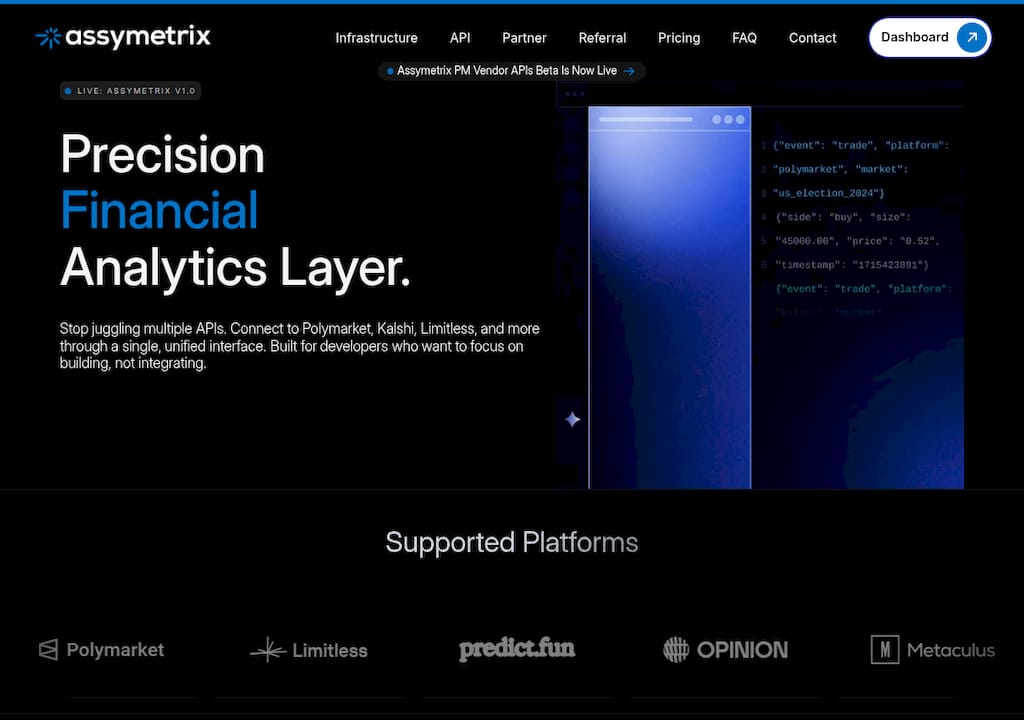
Maintaining separate integrations for Kalshi, Polymarket, and Limitless means three auth flows, three schemas, and three failure modes to monitor. The Assymetrix Data API collapses that into one normalized feed: real-time streaming, historical bulk exports, Smart Money signals, Trader Skill Scores, and cross-venue arbitrage detection, all from a single key.
The free tier gives you unlimited current market metadata and full playground access. Paid tiers unlock historical depth, higher streaming throughput, and on-chain wallet reconstructions. For teams building in Python, the Python developer guide covers SDK setup and additional code examples beyond the quickstart above.
Register for a free API key at data.assymetrix.com, test your first endpoint in the playground, and run the quickstart before committing to any infrastructure decisions.
Useful sources and further reading
Prediction market data feed: real-time and historical API guide
Prediction market signals: cross-venue data guide for quants
FAQ
What does the Assymetrix Data API return for Kalshi markets?
The API returns normalized market metadata, orderbook snapshots, trade records, event states, and settlement data for Kalshi markets, all mapped to a canonical schema with float-probability price fields.
How do you authenticate with the Assymetrix Data API?
Pass your API key as a Bearer token in the Authorization header on every request. Store the key in an environment variable or secrets manager; never embed it in client-side code.
Can you access Kalshi historical data through Assymetrix?
Yes. The /bulk/export endpoint provides access to historical Kalshi trade and snapshot data. Assymetrix has indexed nearly two billion on-chain events and over 200 million price snapshots; paid tiers unlock full historical depth.
What is the difference between streaming and bulk export for Kalshi data?
Streaming via WebSocket delivers real-time trade and orderbook updates for live strategies. Bulk export delivers compressed historical archives (Parquet or NDJSON) for backtesting and model training; use bulk export to avoid consuming streaming rate-limit budget on historical work.
Does Assymetrix cover venues other than Kalshi?
Yes. The same unified API covers Polymarket and Limitless alongside Kalshi, all normalized into the same canonical schema so cross-venue strategies require no per-venue integration work.
Kalshi API Tutorial: Real-Time Event Market Data
TL;DR:
The Assymetrix Data API provides a unified, normalized endpoint for real-time and historical Kalshi market data. It simplifies integration by serving venue-neutral schemas for trades, orderbooks, and events, reducing engineering overhead. The API supports both live streaming and bulk exports, enabling efficient strategy development and backtesting.
The fastest path to normalized, real-time Kalshi event and market data is a single unified endpoint: the Assymetrix Data API. One integration delivers Kalshi markets, orderbooks, trades, events, settlements, and series alongside Polymarket and Limitless, all normalized into a venue-neutral schema. No per-venue auth juggling, no schema-drift tax.
To start immediately:
Register for an API key at data.assymetrix.com
Test the
/marketsdiscovery endpoint in the developer playgroundRun the Python quickstart in the code section below
Assymetrix indexes a substantial volume of structured prediction market data spanning a large number of rows of trading activity across Kalshi, Polymarket, and Limitless.
Table of Contents
How does the Assymetrix unified Data API expose Kalshi data?
What fields does the canonical schema return for Kalshi markets?
Which endpoints do you call for real-time Kalshi event data?
Python quickstart: stream live Kalshi market data via Assymetrix
Authentication, rate limits, and connection best practices
How do you handle market lifecycle states in production?
How do you build a research-ready historical Kalshi dataset?
Production hardening: what does a reliable Kalshi data feed require?
Common pitfalls and how to fix them fast
Key Takeaways
What engineering teams actually do with unified Kalshi data
One endpoint for Kalshi, Polymarket, and Limitless data
Useful sources and further reading
How does the Assymetrix unified Data API expose Kalshi data?
One read-only API surface delivers Kalshi data normalized into a venue-neutral schema. Assymetrix ingests raw Kalshi REST and WebSocket feeds, runs them through an indexer and normalizer, then serves a canonical view through its own REST and streaming endpoints.
The ingestion pipeline looks like this: Kalshi REST + WebSocket feeds feed an indexer that produces canonical schema records, which are stored and served through the Assymetrix REST API, streaming endpoint, and developer playground. Client code never touches venue-specific wire formats.
Kalshi’s API is REST-based with WebSocket support and uses centralized orderbook semantics, which differs structurally from on-chain venues that require parsing blockchain event logs. Normalizing both into one schema is non-trivial. Assymetrix handles that translation server-side, so your downstream code stays venue-agnostic.
With monthly prediction market trading volume now exceeding $23 billion, the engineering cost of maintaining bespoke per-venue integrations has become the primary bottleneck for institutional adoption. A unified canonical layer shortens the research-to-production cycle measurably.
Layer | What happens |
|---|---|
Ingestion | Kalshi REST polling + WebSocket stream consumed continuously |
Normalization | Venue fields mapped to canonical schema; price formats converted to float probability |
Storage | Indexed in time-series and columnar stores; historical archive pre-built |
API surface | REST endpoints + streaming (SSE/WebSocket); developer playground |
Pro Tip: Use the developer playground to inspect canonical field names before writing any storage schema. Locking your database columns to canonical names now prevents a painful migration later.
What fields does the canonical schema return for Kalshi markets?
The canonical schema returns stable field names for markets, outcomes, ticks, trades, orderbook snapshots, events, and settlements. Your downstream code references market_id and last_trade_price regardless of whether the source is Kalshi or any other covered venue.
Canonical field | Example value (Kalshi source) | Notes |
|---|---|---|
|
| Stable across venue updates |
|
| Raw Kalshi ticker preserved |
|
| YES/NO mapped to binary |
| — | ISO 8601 UTC |
| — | ISO 8601 UTC |
|
| Float probability (0–1) |
| — | Float probability |
| — | Float probability |
volume | — | Contracts |
|
|
|
Kalshi prices arrive as USD strings in a 0–1 range (_dollars fields). Assymetrix converts these server-side to a float probability, so cross-venue strategies run against a consistent numeric format without per-venue conversion logic in your models.
Resolution rules and settlement metadata are preserved in contract-level metadata fields. Indexing at scale revealed systematic resolution-rule mismatches across venues, which is why canonical metadata must carry venue-specific resolution logic rather than assuming a universal settlement model.
settlement_price: final resolved probability (0.0 or 1.0 for binary)resolution_source: venue-level rule string preserved verbatimliquidity_quality_score: spread and trader-concentration metric, not raw volume
Which endpoints do you call for real-time Kalshi event data?
The unified API covers discovery, snapshots, trades, time-series, events, and bulk archive exports. All responses use the canonical schema.
Endpoint | Method | Purpose |
|---|---|---|
| GET | Discovery; filter by venue, status, event type |
| GET | Current orderbook snapshot |
| GET / stream | Trade history or live trade stream |
| GET | OHLC candles / price series |
| POST | Historical backfill; returns manifest + download URLs |
| WebSocket / SSE | Real-time market, trade, and event updates |
A minimal REST discovery request:
GET https://data.assymetrix.com/v1/markets?venue=kalshi&status=open
Authorization: Bearer YOUR_API_KEY
Response excerpt:
{
  "markets": [
    {
      "market_id": "asy_klsh_INXD-23DEC31-B4500",
      "venue_market_ticker": "INXD-23DEC31-B4500",
      "last_trade_price": 0.62,
      "settlement_status": "open"
    }
  ],
  "cursor": "eyJvZmZzZXQiOjEwMH0="
}
Pagination uses opaque cursor tokens. Pass cursor from the previous response as a query parameter to advance. For streaming, the WebSocket channel pushes incremental updates; expect sub-second update cadence for active Kalshi markets during high-volume periods.
The unified API is read-only by design. Order execution stays on the venue. This means your ingestion pipeline carries no execution risk and requires only a data-tier API key, not trading credentials.
Assymetrix provides a developer playground where you can test every endpoint against live data before writing a line of production code.
Python quickstart: stream live Kalshi market data via Assymetrix
One script handles REST discovery, WebSocket subscription, reconnect logic, and normalized output. Copy, set your key, and run.
import os, json, time, websocket, requests

API_KEY = os.environ["ASSYMETRIX_API_KEY"]
BASE_URL = "https://data.assymetrix.com/v1"
WS_URL  = "wss://data.assymetrix.com/v1/stream"
HEADERS = {"Authorization": f"Bearer {API_KEY}"}

# 1. Discover open Kalshi markets
resp = requests.get(f"{BASE_URL}/markets",
                    params={"venue": "kalshi", "status": "open"},
                    headers=HEADERS)
markets = resp.json()["markets"]
market_ids = [m["market_id"] for m in markets[:5]]
print(f"Subscribing to {len(market_ids)} markets")

# 2. Stream trades and orderbook updates
def on_message(ws, raw):
    msg = json.loads(raw)
    with open("kalshi_feed.ndjson", "a") as f:
        f.write(json.dumps(msg) + "
")
    print(msg)

def on_error(ws, err):
    print(f"Error: {err}")

def on_open(ws):
    ws.send(json.dumps({
        "action": "subscribe",
        "channels": ["trades", "orderbook"],
        "market_ids": market_ids
    }))

# 3. Reconnect with exponential backoff + jitter
def connect(attempt=0):
    delay = min(2 ** attempt + (time.time() % 1), 60)
    if attempt > 0:
        time.sleep(delay)
    ws = websocket.WebSocketApp(
        WS_URL,
        header=[f"Authorization: Bearer {API_KEY}"],
        on_open=on_open,
        on_message=on_message,
        on_error=on_error,
        on_close=lambda ws, c, m: connect(attempt + 1)
    )
    ws.run_forever()

connect()
Expected output (normalized trade record):
{
  "type": "trade",
  "market_id": "asy_klsh_INXD-23DEC31-B4500",
  "price": 0.62,
  "size": 500,
  "side": "yes",
  "ts": "2026-05-15T14:23:01.412Z"
}
Set
ASSYMETRIX_API_KEYin your environment before running.The
on_closecallback re-invokesconnectwith an incremented attempt counter, producing exponential backoff capped at 60 seconds.Each normalized message appends to
kalshi_feed.ndjsonfor local replay or downstream ingestion.Swap the file write for a Kafka producer call to route messages into a durable queue.
Pro Tip: Checkpoint the last ts value you successfully processed to a durable store (Redis, Postgres). On reconnect, request a backfill from that timestamp before resuming the stream so you never have a gap in your orderbook state.
Authentication, rate limits, and connection best practices
Assymetrix authenticates via API key passed as a Bearer token in the Authorization header. Never embed keys in client-side code or commit them to version control.
Required header:
Authorization: Bearer YOUR_API_KEY401 Unauthorized: key missing, malformed, or revoked; check environment variable binding
429 Too Many Requests: rate limit hit; read
Retry-Afterheader and back off503 Service Unavailable: transient; apply exponential backoff with jitter (see quickstart above)
The free tier provides unlimited current market metadata; paid tiers unlock historical depth, higher streaming throughput, and bulk export access. For large historical backfills, use /bulk/export rather than hammering the streaming endpoint, which conserves your rate-limit budget for live signals.
Security checklist:
Store keys in environment variables or a secrets manager (AWS Secrets Manager, HashiCorp Vault)
Rotate keys on a schedule and immediately after any suspected exposure
Apply IP allowlists on production ingestion nodes to restrict key usage to known egress IPs
Use short-lived tokens for server processes where the API supports token refresh
Pro Tip: Multiplex multiple market subscriptions over a single WebSocket connection rather than opening one connection per market. Most rate limits apply per connection, not per subscription channel.
How do you handle market lifecycle states in production?
Treat market state as authoritative from the canonical feed. Ingest every state transition and reconcile positions immediately after settlement events arrive.
The canonical state machine:
State | Trigger event |
|---|---|
| Market created, not yet open |
| Trading window starts |
| Venue halts trading (regulatory or data issue) |
| Outcome determined; settlement price set |
| Funds distributed; final state |
Never infer market state from price alone. A price of 0.99 does not mean a market is resolved. Rely on the
settlement_statusfield and listen for explicitmarket_resolvedandmarket_settledevent types on the stream. Inferring state from price is the most common source of incorrect P&L calculations in production systems.
Reconciliation checklist:
Delta-check
last_trade_priceagainstsettlement_priceon resolution eventsReconcile stored orderbook snapshots to final fills after
settledstate arrivesRun a periodic full-market-state hash against the API to catch missed events during stream gaps
Preserve
resolution_sourcemetadata so automated settlement handling follows contract-specific rules, not a generic binary assumption
Kalshi’s centralized orderbook means settlement is deterministic and CFTC-regulated, which reduces ambiguity compared to on-chain venues. The canonical feed preserves that regulatory metadata so your system can act on it programmatically.
How do you build a research-ready historical Kalshi dataset?
Use the Data API’s bulk export for backtests; use time-series snapshots for intraday price surfaces. Do not rely on venue public endpoints for complete historical depth — official exchange APIs typically provide current-state snapshots, not full historical orderbook depth.
Assymetrix has indexed a very large number of on-chain events and price snapshots, creating a continuous probability surface available for immediate export.
Export flow:
POST to
/bulk/exportwith venue, date range, and data type (trades, snapshots, orderbook)Receive a manifest with signed download URLs and checksums
Download compressed files (Parquet or NDJSON format)
Validate checksums before loading
Load into your analytics store: ClickHouse or DuckDB for ad-hoc queries, Delta Lake for large-scale backtests
Data type | Recommended store | Retention guidance |
|---|---|---|
High-frequency snapshots | Time-series DB (InfluxDB, TimescaleDB) | — |
Trade history | Columnar (ClickHouse, DuckDB) | Full history; partition by month |
Orderbook depth | Object storage (Parquet) | Keep raw; query on demand |
Paid tiers unlock historical depth beyond the free discovery window and on-chain reconstructions for wallet-level analysis. Plan incremental nightly backfills rather than periodic full re-indexes to control egress costs. For a detailed walkthrough of backtesting with Assymetrix price snapshots, the platform’s blog covers the full workflow.
Production hardening: what does a reliable Kalshi data feed require?
Treat the data feed as mission-critical infrastructure. Design for stream gaps, transient API errors, and message spikes from high-volume market events.
The failure mode that kills production systems is not a crash — it’s silent data loss. A stream that reconnects without replaying missed messages produces a corrupted orderbook state that looks correct until a settlement reconciliation fails hours later.
Monitoring checklist:
Ingestion latency: alert when message-to-database lag exceeds your SLA threshold
Stream health: track heartbeat intervals; alert on missed heartbeats
Event gap detection: compare sequential message IDs or timestamps; flag gaps immediately
Message validation errors: count schema mismatches per minute; spike = upstream format change
Downstream consumer lag: monitor queue depth if routing through Kafka or similar
High-availability patterns:
Run two ingestion nodes in active/standby; use leader election (ZooKeeper, etcd) to prevent duplicate writes
Buffer all incoming messages in a durable queue before processing
Hot-standby reconnect: second node maintains a warm WebSocket connection and promotes on leader failure
Pro Tip: Inject synthetic test messages into your pipeline daily to verify end-to-end processing without waiting for a real market event. A settlement test message that never reaches your reconciliation job is a bug you want to find in staging, not during a live resolution.
Common pitfalls and how to fix them fast
The three highest-probability mistakes: assuming schema stability across venue updates, missing settlement metadata, and naive retry logic that compounds load during outages.
Schema-drift assumption: pin to canonical field names, not venue-native fields; canonical names are stable even when Kalshi changes its wire format
Missing settlement metadata: always store
resolution_sourceandsettlement_priceon resolution events; do not reconstruct them from trade historyNaive retry on 429: read
Retry-Afterbefore retrying; a tight retry loop during rate limiting extends your blackout windowTimezone errors: all canonical timestamps are UTC ISO 8601; convert to local time only at display layer, never in storage
Venue ID vs canonical ID confusion: log both
market_idandvenue_market_tickerduring development; mismatches surface immediately in logs
Quick debugging checks:
# Check API status
curl -H "Authorization: Bearer $KEY" https://data.assymetrix.com/v1/status

# Validate a single market record
curl -H "Authorization: Bearer $KEY" \
  "https://data.assymetrix.com/v1/markets/asy_klsh_INXD-23DEC31-B4500"
Pro Tip: Capture and preserve raw WebSocket messages for 72 hours in a cheap object store (S3, GCS). When a production incident occurs, you can replay the exact message sequence that caused it without relying on reconstructed logs.
Key Takeaways
The Assymetrix Data API delivers normalized, real-time Kalshi market and event data through a single unified endpoint, covering extensive historical data and a very large volume of trading activity across Kalshi, Polymarket, and Limitless.
Point | Details |
|---|---|
Single unified endpoint | One API key and one integration delivers normalized Kalshi, Polymarket, and Limitless data. |
Canonical schema stability | Field names like |
Streaming vs bulk export | Use WebSocket streaming for live signals; use |
Settlement reconciliation | Always ingest explicit |
Assymetrix historical depth | Over 1.5 TB indexed, including nearly two billion on-chain events and 200+ million price snapshots available for export. |
What engineering teams actually do with unified Kalshi data
The teams getting the most out of a unified Kalshi feed are not just replacing a direct API call but also leveraging QuantGenie - No-Code Trading Algorithm Platform to accelerate their strategy prototyping. They are running pipelines that would be impractical to build against venue-native endpoints.
A common pattern: one ingestion process subscribes to the Assymetrix stream and fans out to three consumers. The first writes normalized trades to a time-series store for a live arbitrage scanner that compares Kalshi probabilities against Polymarket prices on the same underlying event. The second feeds a Trader Skill Score pipeline that tracks which wallets consistently take positions ahead of price moves. The third writes to a feature store that a nightly job refreshes for model retraining.
The arbitrage scanner is where cross-venue divergence signals become concrete. When Kalshi and Polymarket disagree on the same event by more than a threshold, the scanner fires an alert. Smart Money wallet tracking adds a second filter: if the divergence coincides with large positions from historically skilled wallets, the signal weight increases. Neither of those layers requires custom venue integrations. Both run off the same canonical feed.
The nightly backfill job is the part most teams underestimate. Keeping a training dataset current means pulling incremental exports, validating checksums, and appending to a columnar store without duplicating records. The bulk export workflow handles the heavy lifting; the engineering team writes the append logic once and schedules it.
One endpoint for Kalshi, Polymarket, and Limitless data
Maintaining separate integrations for Kalshi, Polymarket, and Limitless means three auth flows, three schemas, and three failure modes to monitor. The Assymetrix Data API collapses that into one normalized feed: real-time streaming, historical bulk exports, Smart Money signals, Trader Skill Scores, and cross-venue arbitrage detection, all from a single key.
The free tier gives you unlimited current market metadata and full playground access. Paid tiers unlock historical depth, higher streaming throughput, and on-chain wallet reconstructions. For teams building in Python, the Python developer guide covers SDK setup and additional code examples beyond the quickstart above.
Register for a free API key at data.assymetrix.com, test your first endpoint in the playground, and run the quickstart before committing to any infrastructure decisions.
Useful sources and further reading
Prediction market data feed: real-time and historical API guide
Prediction market signals: cross-venue data guide for quants
FAQ
What does the Assymetrix Data API return for Kalshi markets?
The API returns normalized market metadata, orderbook snapshots, trade records, event states, and settlement data for Kalshi markets, all mapped to a canonical schema with float-probability price fields.
How do you authenticate with the Assymetrix Data API?
Pass your API key as a Bearer token in the Authorization header on every request. Store the key in an environment variable or secrets manager; never embed it in client-side code.
Can you access Kalshi historical data through Assymetrix?
Yes. The /bulk/export endpoint provides access to historical Kalshi trade and snapshot data. Assymetrix has indexed nearly two billion on-chain events and over 200 million price snapshots; paid tiers unlock full historical depth.
What is the difference between streaming and bulk export for Kalshi data?
Streaming via WebSocket delivers real-time trade and orderbook updates for live strategies. Bulk export delivers compressed historical archives (Parquet or NDJSON) for backtesting and model training; use bulk export to avoid consuming streaming rate-limit budget on historical work.
Does Assymetrix cover venues other than Kalshi?
Yes. The same unified API covers Polymarket and Limitless alongside Kalshi, all normalized into the same canonical schema so cross-venue strategies require no per-venue integration work.
Other Blog


