How to Connect to the Polymarket API: A Developer Guide
How to Connect to the Polymarket API: A Developer Guide
How to Connect to the Polymarket API: A Developer Guide
Learn how to connect to the Polymarket API. A Developer Guide detailing the essentials for accessing market data and trading efficiently.

How to Connect to the Polymarket API: A Developer Guide
TL;DR:
Polymarket’s Gamma API provides public read-only market data without credentials, while the CLOB API requires a signed wallet payload for trading. Using the correct API surface—Gamma for information, CLOB for orders, or on-chain data for verification—prevents common integration errors. The Assymetrix Data API offers normalized, cross-venue historical data and signals, reducing development complexity.
For read-only market data, call Polymarket’s public Gamma REST endpoints with no credentials. For trading, you need a wallet signer and a funded pUSD balance wired through the CLOB API. If you need normalized cross-venue data with historical depth, the Assymetrix Data API at data.assymetrix.com gives you Polymarket, Kalshi, and Limitless through a single authenticated call.
Before you write a line of code, confirm these prerequisites:
A Polygon-compatible wallet address (MetaMask or any EIP-712-compatible signer works)
pUSD balance on Polygon mainnet if you plan to place orders
Python 3.9+ with
requestsinstalled for the examples belowNode.js 18+ if you use the
@polymarket/clientTypeScript SDK
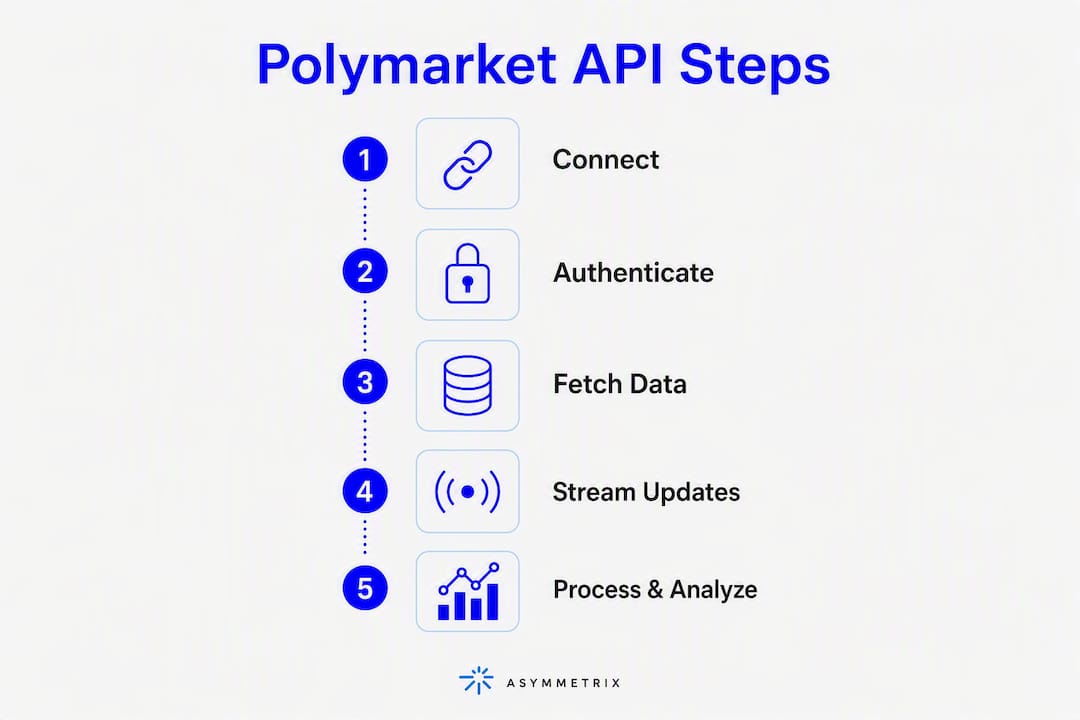
Fastest path to a working data feed:
Call
GET https://gamma-api.polymarket.com/marketswith no auth header — you get a paginated list of active markets immediately.Parse
conditionId,bestBid,bestAsk, andvolumefrom the response.Add a signer only when you move to order placement via the CLOB API.
import requests

GAMMA_BASE = "https://gamma-api.polymarket.com"

def fetch_markets(limit=20, offset=0):
    resp = requests.get(
        f"{GAMMA_BASE}/markets",
        params={"limit": limit, "offset": offset, "active": "true"},
        timeout=10
    )
    resp.raise_for_status()
    return resp.json()

markets = fetch_markets()
for m in markets:
    print(m.get("question"), m.get("bestBid"), m.get("bestAsk"))
import requests

GAMMA_BASE = "https://gamma-api.polymarket.com"

def fetch_markets(limit=20, offset=0):
    resp = requests.get(
        f"{GAMMA_BASE}/markets",
        params={"limit": limit, "offset": offset, "active": "true"},
        timeout=10
    )
    resp.raise_for_status()
    return resp.json()

markets = fetch_markets()
for m in markets:
    print(m.get("question"), m.get("bestBid"), m.get("bestAsk"))
The single most common first-day mistake: developers hit the CLOB trading endpoints without a signer and get a 401, then assume the entire API requires auth. It does not. Read-only data lives on Gamma and requires nothing but an HTTP client.
Table of Contents
How does Polymarket’s API architecture actually work?
How do you authenticate for read-only vs trading access?
What are the key Polymarket endpoints and what do they return?
How do you implement real-time streaming from Polymarket?
What are the most common Polymarket integration pitfalls?
A runnable Python example: fetch live Polymarket market data
Direct Polymarket integration vs the Assymetrix unified Data API
Testing and monitoring your Polymarket integration before it goes live
What should you do in the next 30–90 minutes to get a working pipeline?
Key Takeaways
The real cost of “just building it directly”
Assymetrix gives you normalized Polymarket data without the decoding work
Useful sources and reference links
How does Polymarket’s API architecture actually work?
Polymarket exposes three distinct surfaces, and calling the wrong one for a given job costs you hours. The short answer: Gamma handles market data aggregation and quoting, CLOB handles order placement and the live order book, and the Data API (plus on-chain Polygon events) handles historical records and on-chain verification.
Here is the conceptual data flow:
Your client
    │
    ├─► Gamma REST API (gamma-api.polymarket.com)
    │       Market lists, prices, volume, outcomes
    │
    ├─► CLOB API (clob.polymarket.com)
    │       Order book snapshots, place/cancel orders
    │       Requires signed payloads (EIP-712)
    │
    └─► Polygon on-chain events + Data API
            Historical fills, settlement proofs
            On-chain reconciliation
Your client
    │
    ├─► Gamma REST API (gamma-api.polymarket.com)
    │       Market lists, prices, volume, outcomes
    │
    ├─► CLOB API (clob.polymarket.com)
    │       Order book snapshots, place/cancel orders
    │       Requires signed payloads (EIP-712)
    │
    └─► Polygon on-chain events + Data API
            Historical fills, settlement proofs
            On-chain reconciliation
Gamma is the right first call for almost every read-only use case. It aggregates market metadata, best bid/ask, and volume in a clean REST format. The Polymarket API overview documents the full field schema.
CLOB is where orders live. It maintains the central limit order book, processes signed order submissions, and returns fill confirmations. Every order you place goes through CLOB, and every payload must carry a valid EIP-712 signature from your wallet. The official quickstart walks through the minimum viable order flow.
On-chain / Data API is the reconciliation layer. Settlement happens on Polygon, and if you need proof of a fill or want to verify a position against the chain, you decode Polygon event logs. This path is optional for most analytics use cases but mandatory for any system that needs audit-grade accuracy.
When to use which path: use Gamma for dashboards, price feeds, and market discovery; use CLOB for order management and live book state; use on-chain events only when you need settlement proofs or your local state has drifted from the chain.
Pro Tip: Build a thin routing layer in your codebase that maps job types (read market, place order, verify fill) to the correct API surface. Mixing Gamma and CLOB calls in the same function is the fastest way to introduce schema confusion.
How do you authenticate for read-only vs trading access?
Authentication splits cleanly into two modes. Public Gamma endpoints need no credentials. CLOB trading endpoints require a signed payload constructed from your wallet’s private key, following the EIP-712 typed-data standard.
Public (read-only) client
No API key, no signer. Send a plain GET request to any Gamma endpoint. Rate limits apply (more on those in the challenges section), but there is no credential setup.

Secure (trading) client with a signer
The @polymarket/client SDK handles signer wiring in TypeScript:
import { ClobClient } from "@polymarket/client";
import { createWalletClient, http } from "viem";
import { privateKeyToAccount } from "viem/accounts";
import { polygon } from "viem/chains";

const account = privateKeyToAccount(process.env.PRIVATE_KEY as `0x${string}`);
const walletClient = createWalletClient({
  account,
  chain: polygon,
  transport: http(),
});

const clobClient = new ClobClient(
  "https://clob.polymarket.com",
  137,           // Polygon chain ID
  walletClient
);

// Fetch open orders
const orders = await clobClient.getOpenOrders();
import { ClobClient } from "@polymarket/client";
import { createWalletClient, http } from "viem";
import { privateKeyToAccount } from "viem/accounts";
import { polygon } from "viem/chains";

const account = privateKeyToAccount(process.env.PRIVATE_KEY as `0x${string}`);
const walletClient = createWalletClient({
  account,
  chain: polygon,
  transport: http(),
});

const clobClient = new ClobClient(
  "https://clob.polymarket.com",
  137,           // Polygon chain ID
  walletClient
);

// Fetch open orders
const orders = await clobClient.getOpenOrders();
Viem is a TypeScript-native Ethereum library. If you are working in Python, replicate the signing step with eth_account from the web3.py package: construct the EIP-712 domain and message, sign with sign_typed_data, and attach the signature to your request header or body per the CLOB API spec.
from eth_account import Account
from eth_account.messages import encode_typed_data

private_key = os.environ["PRIVATE_KEY"]
acct = Account.from_key(private_key)

# Construct EIP-712 typed data per CLOB spec
typed_data = {
    "domain": {"name": "Polymarket CLOB", "version": "1", "chainId": 137},
    "types": {
        "Order": [
            {"name": "tokenId", "type": "uint256"},
            {"name": "makerAmount", "type": "uint256"},
            {"name": "takerAmount", "type": "uint256"},
            {"name": "nonce", "type": "uint256"},
        ]
    },
    "primaryType": "Order",
    "message": {
        "tokenId": token_id,
        "makerAmount": maker_amount,
        "takerAmount": taker_amount,
        "nonce": nonce,
    }
}

signed = acct.sign_typed_data(
    domain_data=typed_data["domain"],
    message_types=typed_data["types"],
    message_data=typed_data["message"]
)
signature = signed.signature.hex()
from eth_account import Account
from eth_account.messages import encode_typed_data

private_key = os.environ["PRIVATE_KEY"]
acct = Account.from_key(private_key)

# Construct EIP-712 typed data per CLOB spec
typed_data = {
    "domain": {"name": "Polymarket CLOB", "version": "1", "chainId": 137},
    "types": {
        "Order": [
            {"name": "tokenId", "type": "uint256"},
            {"name": "makerAmount", "type": "uint256"},
            {"name": "takerAmount", "type": "uint256"},
            {"name": "nonce", "type": "uint256"},
        ]
    },
    "primaryType": "Order",
    "message": {
        "tokenId": token_id,
        "makerAmount": maker_amount,
        "takerAmount": taker_amount,
        "nonce": nonce,
    }
}

signed = acct.sign_typed_data(
    domain_data=typed_data["domain"],
    message_types=typed_data["types"],
    message_data=typed_data["message"]
)
signature = signed.signature.hex()
Auth mode | Endpoint surface | Credential required | Signing method |
|---|---|---|---|
Public read-only | Gamma REST | None | None |
Trading (order placement) | CLOB REST | Wallet private key | EIP-712 typed data |
On-chain verification | Polygon RPC | RPC endpoint URL | None (read-only) |
SDK (TypeScript) | CLOB via | Viem wallet client | Viem |
Never store a raw private key in source code or a
.envfile committed to version control. Use AWS Secrets Manager, HashiCorp Vault, or a similar secrets store. For CI/CD pipelines, use ephemeral signing keys scoped to a single deployment and rotate them after each run.
Pro Tip: For serverless functions that place orders, generate a fresh signing key per invocation using a KMS-backed key derivation path. This limits blast radius if a key leaks and avoids nonce collision across concurrent function instances.
What are the key Polymarket endpoints and what do they return?
The Polymarket API reference documents every endpoint, but these seven cover the vast majority of integration work.
Endpoint | Method | Path | Primary response fields |
|---|---|---|---|
List markets | GET |
|
|
Market detail | GET |
| Full market object, |
Order book | GET |
|
|
Recent trades | GET |
|
|
Account positions | GET |
|
|
Place order | POST |
|
|
Redeem outcomes | POST |
|
|
A minimal market list response looks like this:
[
  {
    "conditionId": "0xabc123...",
    "question": "Will X happen by Dec 31?",
    "outcomes": ["Yes", "No"],
    "bestBid": 0.62,
    "bestAsk": 0.64,
    "volume": 184320.50,
    "active": true,
    "endDate": "2026-12-31T23:59:59Z"
  }
]
[
  {
    "conditionId": "0xabc123...",
    "question": "Will X happen by Dec 31?",
    "outcomes": ["Yes", "No"],
    "bestBid": 0.62,
    "bestAsk": 0.64,
    "volume": 184320.50,
    "active": true,
    "endDate": "2026-12-31T23:59:59Z"
  }
]
And an order book snapshot:
{
  "bids": [
    {"price": 0.62, "size": 500.0},
    {"price": 0.61, "size": 1200.0}
  ],
  "asks": [
    {"price": 0.64, "size": 300.0},
    {"price": 0.65, "size": 800.0}
  ]
}
{
  "bids": [
    {"price": 0.62, "size": 500.0},
    {"price": 0.61, "size": 1200.0}
  ],
  "asks": [
    {"price": 0.64, "size": 300.0},
    {"price": 0.65, "size": 800.0}
  ]
}
A few schema details that catch developers off guard: prices are decimal fractions between 0 and 1 (not cents or basis points), timestamp fields are Unix epoch in seconds, and outcome indexes are zero-based. Pagination uses limit and offset query parameters. Watch the X-RateLimit-Remaining response header — when it drops to zero, back off immediately rather than waiting for a 429.
On price decimalization: a
bestBidof0.62means 62 cents per share, implying a 62% implied probability. Do not multiply by 100 before storing; keep the raw decimal and convert at display time to avoid floating-point drift in your database.
How do you implement real-time streaming from Polymarket?
Polymarket provides WebSocket streaming for live order book and trade updates. For latency-sensitive consumers, streaming is the right transport. REST polling works for lower-frequency dashboards but introduces lag that compounds under volatile market conditions.
Subscription basics:
Connect to the CLOB WebSocket endpoint and subscribe by
token_id(the outcome token identifier for a specific market side).Send a subscription message specifying the channel:
"market"for order book deltas,"trade"for fill events.The server sends incremental deltas, not full snapshots. You must maintain local state and apply each delta in sequence.
Reliable connection pattern:
Fetch a full REST snapshot of the order book before opening the WebSocket.
Open the WebSocket and begin buffering incoming messages.
Once connected, replay any buffered messages against the snapshot in sequence-number order.
Apply subsequent deltas directly to local state.
On disconnect, re-fetch the REST snapshot and repeat from step 2.
Pro Tip: Convert all incoming timestamps to a single monotonic clock in microseconds before applying deltas to local state. This eliminates reconciliation race conditions between REST snapshots and WebSocket deltas — a pattern detailed in the Assymetrix real-time data feed guide.
For high-throughput consumers, batch small REST queries using composite market filters and use streaming only for per-market micro-updates. This keeps rate-limit pressure low while maintaining low latency where it matters. Implement exponential backoff with jitter on reconnect: start at 500ms, cap at 30 seconds, and add ±20% random jitter to avoid thundering-herd reconnect storms.

What are the most common Polymarket integration pitfalls?
Three problems account for the majority of production incidents on direct Polymarket integrations: on-chain event decoding, schema drift between API surfaces, and rate limiting. Each has a specific mitigation.
The pattern that saves the most debugging time: centralize all decoding and normalization into a single internal library. When Polymarket updates a field name or changes a timestamp format, you fix it in one place rather than hunting through ten services.
On-chain event decoding (Polygon)
Settlement events live on Polygon as raw ABI-encoded logs. Decoding them requires the correct contract ABI, and Polymarket has updated contract addresses over time. Keep a versioned ABI registry in your codebase and validate decoded fields against expected types before writing to your database. A mismatch between uint256 and a Python int overflow is a silent data corruption bug.
Schema inconsistencies between API surfaces
Gamma and CLOB use overlapping but not identical field names for the same market. conditionId in Gamma maps to condition_id in some CLOB responses. Run schema-compatibility tests in CI against a pinned sample response for each endpoint. When a field disappears or changes type, your test suite catches it before production does.
Rate limits and idempotency
Polymarket enforces per-IP rate limits on both Gamma and CLOB. When you hit a 429, do not retry immediately. Use exponential backoff with jitter. For order placement, always include an idempotency key in your POST body. Without one, a network timeout followed by a retry can produce duplicate orders, and partial fills on the first attempt will not be visible until the next poll cycle.
Troubleshooting checklist:
Verify sequence numbers on every WebSocket message before applying deltas
Run a schema validation layer (Pydantic in Python, Zod in TypeScript) on every API response
Check nonce monotonicity before signing any order payload
Store idempotency keys with TTL in Redis or a similar cache
Log raw API responses for 24 hours in staging before promoting to production
Pro Tip: Maintain a small local event store (even a SQLite table in development) that records every raw message with its sequence number. When your local order book drifts from the exchange, replay from the last known-good sequence rather than re-fetching everything. This approach is detailed in the Polymarket trading bot guide.
A runnable Python example: fetch live Polymarket market data
This script fetches active markets from the Gamma API, prints best bid/ask for each, and then pulls an order book snapshot for the first result. Copy it, run it, and extend it.
Dependencies: pip install requests
No credentials needed for this read-only example.
import os
import requests

GAMMA_BASE = "https://gamma-api.polymarket.com"
CLOB_BASE  = "https://clob.polymarket.com"

def fetch_active_markets(limit=10):
    """Fetch a page of active markets from the Gamma API."""
    resp = requests.get(
        f"{GAMMA_BASE}/markets",
        params={"limit": limit, "active": "true", "closed": "false"},
        timeout=10,
    )
    resp.raise_for_status()
    return resp.json()

def fetch_orderbook(token_id: str):
    """Fetch a full order book snapshot for a given outcome token."""
    resp = requests.get(
        f"{CLOB_BASE}/book",
        params={"token_id": token_id},
        timeout=10,
    )
    resp.raise_for_status()
    return resp.json()

def parse_top_of_book(book: dict):
    """Return best bid and best ask from an order book snapshot."""
    bids = sorted(book.get("bids", []), key=lambda x: float(x["price"]), reverse=True)
    asks = sorted(book.get("asks", []), key=lambda x: float(x["price"]))
    best_bid = bids[0]["price"] if bids else None
    best_ask = asks[0]["price"] if asks else None
    return best_bid, best_ask

if __name__ == "__main__":
    print("Fetching active Polymarket markets...
")
    markets = fetch_active_markets(limit=5)

    for market in markets:
        question  = market.get("question", "N/A")
        condition = market.get("conditionId", "")
        bid       = market.get("bestBid", "N/A")
        ask       = market.get("bestAsk", "N/A")
        volume    = market.get("volume", 0)
        print(f"Market : {question}")
        print(f"  Condition ID : {condition}")
        print(f"  Best Bid     : {bid}  |  Best Ask: {ask}")
        print(f"  Volume       : ${volume:,.2f}")
        print()

    # Pull a live order book snapshot for the first market's first outcome token
    first_market = markets[0] if markets else {}
    tokens = first_market.get("clobTokenIds", [])
    if tokens:
        token_id = tokens[0]
        print(f"Order book snapshot for token {token_id}:")
        book = fetch_orderbook(token_id)
        best_bid, best_ask = parse_top_of_book(book)
        print(f"  Top of book  — Bid: {best_bid}  Ask: {best_ask}")
import os
import requests

GAMMA_BASE = "https://gamma-api.polymarket.com"
CLOB_BASE  = "https://clob.polymarket.com"

def fetch_active_markets(limit=10):
    """Fetch a page of active markets from the Gamma API."""
    resp = requests.get(
        f"{GAMMA_BASE}/markets",
        params={"limit": limit, "active": "true", "closed": "false"},
        timeout=10,
    )
    resp.raise_for_status()
    return resp.json()

def fetch_orderbook(token_id: str):
    """Fetch a full order book snapshot for a given outcome token."""
    resp = requests.get(
        f"{CLOB_BASE}/book",
        params={"token_id": token_id},
        timeout=10,
    )
    resp.raise_for_status()
    return resp.json()

def parse_top_of_book(book: dict):
    """Return best bid and best ask from an order book snapshot."""
    bids = sorted(book.get("bids", []), key=lambda x: float(x["price"]), reverse=True)
    asks = sorted(book.get("asks", []), key=lambda x: float(x["price"]))
    best_bid = bids[0]["price"] if bids else None
    best_ask = asks[0]["price"] if asks else None
    return best_bid, best_ask

if __name__ == "__main__":
    print("Fetching active Polymarket markets...
")
    markets = fetch_active_markets(limit=5)

    for market in markets:
        question  = market.get("question", "N/A")
        condition = market.get("conditionId", "")
        bid       = market.get("bestBid", "N/A")
        ask       = market.get("bestAsk", "N/A")
        volume    = market.get("volume", 0)
        print(f"Market : {question}")
        print(f"  Condition ID : {condition}")
        print(f"  Best Bid     : {bid}  |  Best Ask: {ask}")
        print(f"  Volume       : ${volume:,.2f}")
        print()

    # Pull a live order book snapshot for the first market's first outcome token
    first_market = markets[0] if markets else {}
    tokens = first_market.get("clobTokenIds", [])
    if tokens:
        token_id = tokens[0]
        print(f"Order book snapshot for token {token_id}:")
        book = fetch_orderbook(token_id)
        best_bid, best_ask = parse_top_of_book(book)
        print(f"  Top of book  — Bid: {best_bid}  Ask: {best_ask}")
Usage notes:
Run with
python polymarket_fetch.py. No environment variables required for read-only access.To add trading, import
eth_account, construct the EIP-712 payload from the authentication section above, and POST tohttps://clob.polymarket.com/order.To convert this into a streaming consumer, replace the
fetch_orderbookpolling loop with awebsocket-clientorasyncioWebSocket connection subscribing to themarketchannel.
Extending to a long-running consumer: wrap
fetch_active_marketsin a scheduler (APScheduler or a simplewhile Truewithtime.sleep) and push results to a local database or message queue. Keep the HTTP session alive withrequests.Session()to reuse TCP connections and reduce latency.
For a deeper Python prediction market data guide with extended examples including signing flows and streaming consumers, the Assymetrix developer library covers the full pattern.
On idempotency in Python trading scripts: always generate a UUID for each order attempt and store it before sending the POST. If the request times out, re-send with the same UUID. The CLOB API uses it to deduplicate, so you will not get a double fill.
Direct Polymarket integration vs the Assymetrix unified Data API
For a quick single-venue analytics project, building directly against Polymarket is viable. For production systems that need normalized schemas, cross-venue signals, or historical depth beyond what the live API exposes, the engineering cost of direct integration compounds quickly.
Dimension | Direct Polymarket integration | Assymetrix unified Data API |
|---|---|---|
What you can do | Single-venue market data, trading, on-chain verification | Cross-venue data (Polymarket + Kalshi + Limitless), normalized schema, Smart Money tracking |
Auth method | None (read-only) or EIP-712 wallet signer (trading) | Single API key, REST or streaming |
Real-time access | WebSocket streaming (CLOB channel) | Unified streaming endpoint, normalized deltas |
Schema normalization | Manual: Gamma/CLOB fields differ, on-chain decoding required | Pre-normalized: single schema across all venues |
Historical data | Limited via live API; on-chain requires Polygon archive node | extensive data of trading activity |
Integration time | Days to weeks (read-only); weeks to months (trading + reconciliation) | Hours to days for normalized access |
Rate limits | Per-IP Polymarket limits; no SLA | Managed, with documented tiers |
Cost | Engineering time + infrastructure | Subscription (free and paid tiers) |
When to build direct: you need fine-grained control over order routing, custom matching logic, or you are building a trading system where latency to the CLOB is the primary constraint.
When to use Assymetrix: you are building analytics, AI agents, quant research pipelines, or cross-venue signal systems where normalized schema and historical depth for backtesting matter more than raw CLOB access. The cross-venue arbitrage guide shows exactly how that signal layer works in practice.
Pro Tip: Even if you build direct for trading, consider routing your analytics and historical queries through Assymetrix. You get the control of direct CLOB access for execution and the normalized depth of the unified API for research — without rebuilding the normalization layer yourself.
Testing and monitoring your Polymarket integration before it goes live
Plan your test suite before you write production traffic. The most expensive bugs in prediction market integrations are silent ones: a schema field that changed type, a sequence number gap that went undetected, or a duplicate order that filled twice.
Production readiness checklist:
Sandbox credentials: Polymarket does not publish a dedicated sandbox environment publicly. Use a separate wallet with a minimal pUSD balance for staging tests, and gate all order placement behind a
DRY_RUNenvironment variable.Schema regression tests: pin a sample response for each endpoint and run a Pydantic (Python) or Zod (TypeScript) validation on every CI run. When Polymarket updates a field, your test fails before your production parser does.
Idempotency tests: send the same order payload twice with the same idempotency key and verify you receive one fill, not two.
Sequence gap detection: inject a synthetic gap into your WebSocket message stream in tests and verify your reconciler triggers a snapshot re-fetch.
End-to-end dry-run: place a minimum-size order in staging, verify the
orderIdandstatusfields, then cancel it. Confirm the cancellation propagates to your local order state.Load test: simulate your peak query rate against Gamma and verify your backoff logic triggers correctly before you hit a 429 in production.
Incident playbook:
Detect a sequence gap via missing sequence numbers in your event store.
Trigger a full REST snapshot reconciliation immediately.
Throttle all streaming consumers to read-only mode during reconciliation.
If reconciliation fails after two retries, fall back to the Assymetrix aggregated feed as a backup data source.
Alert on any position discrepancy greater than your defined tolerance threshold.
Pro Tip: Run schema-compatibility tests against a recorded fixture of the last 30 days of API responses, not just the current response. Polymarket has updated field names and added nullable fields without versioning the endpoint. Historical fixtures catch regressions that a single live call misses.
What should you do in the next 30–90 minutes to get a working pipeline?
Follow this sequence and you will have a live data feed in under an hour, with a clear path to trading if you need it.
Immediate action list:
Run the Python example from Section 7. Confirm you get market data back with no errors.
Inspect the
conditionIdandclobTokenIdsfields in the response — these are your keys for all subsequent calls.Pull an order book snapshot for one market using the
fetch_orderbookfunction.Set up a WebSocket connection to the CLOB streaming endpoint and subscribe to one market channel. Verify you receive delta messages.
Add a Pydantic model for the market response schema and run it against your first response.
If you need trading: create a Polygon wallet, fund it with pUSD, and wire the EIP-712 signer from Section 3.
Evaluate the Assymetrix Data API if you need normalized cross-venue data, historical depth, or Smart Money signals without building the normalization layer yourself.
The official Polymarket documentation covers the full endpoint reference. For normalized cross-venue access, the Assymetrix developer resource hub has guides for Python, streaming, backtesting, and AI agent workflows.
Pro Tip: Spend the first 30 minutes on read-only Gamma calls only. Get your parser working and your schema tests passing before you touch the CLOB. The authentication complexity of trading is much easier to debug once you already understand the data shapes.
Key Takeaways
Connecting to the Polymarket API requires no credentials for read-only Gamma data, an EIP-712 wallet signer for CLOB trading, and a normalization strategy for production cross-venue systems.
Point | Details |
|---|---|
Start with Gamma, no auth | Public Gamma endpoints return market data immediately with a plain GET request and no credentials. |
CLOB trading needs EIP-712 | Order placement requires a wallet signer; use Viem (TypeScript) or |
Schema normalization is non-trivial | Gamma and CLOB use different field names for the same market; centralize decoding into one library. |
Streaming needs snapshot reconciliation | Maintain a local event store and re-fetch REST snapshots on any sequence gap to prevent order book drift. |
Assymetrix removes normalization overhead | The Assymetrix Data API provides a single normalized schema across Polymarket, Kalshi, and Limitless, with nearly 1 billion rows of historical data. |
The real cost of “just building it directly”
The conventional wisdom among developers new to prediction market APIs is that direct integration is the straightforward path and a unified API is a luxury for larger teams. That framing gets the tradeoff backwards.
Direct Polymarket integration is genuinely simple for the first endpoint call. The Gamma market list returns clean JSON in under 200ms, and you feel productive immediately. The complexity arrives later, in layers. On-chain reconciliation is not optional if you care about position accuracy. Schema drift between Gamma and CLOB is not documented in a changelog. Rate limits are not published with SLA guarantees. And none of that accounts for the second venue you will eventually want to add.
The teams that build the most durable prediction market systems treat normalization as infrastructure, not an afterthought. A single decoding library, a local event store, and a schema contract test suite are not over-engineering. They are the minimum viable production setup. The developers who skip those steps spend their third month debugging silent data corruption rather than building the signal logic they actually wanted to build.
For pure trading execution where CLOB latency is the constraint, build direct. For everything else — analytics, AI agents, quant research, cross-venue signals — the engineering time saved by a normalized unified API compounds across every new market and every new venue you add. The AI agents in prediction markets guide shows what that downstream leverage looks like in practice.
Assymetrix gives you normalized Polymarket data without the decoding work
Direct integration gives you control. The Assymetrix Data API gives you speed. For developers who need production-grade prediction market data without rebuilding the normalization and on-chain reconciliation stack, Assymetrix provides a single REST and streaming API that covers Polymarket, Kalshi, and Limitless through one authenticated connection.
The platform is built on a very large volume of historical trading activity. You get normalized schemas across all three venues, unified authentication, Smart Money wallet tracking, Trader Skill Scores, and cross-venue arbitrage signals — all without writing a single ABI decoder or managing Polygon RPC endpoints. For quant researchers and AI agent developers, the prediction market accuracy data guide and the full developer learn hub cover every integration pattern from Python scripts to production streaming pipelines.
Start with the free tier at data.assymetrix.com and have normalized market data running in your environment within the hour.
Useful sources and reference links
For developers keeping these open in a second tab while integrating:
Official Polymarket documentation:
Polymarket Documentation Overview — start here for the full API surface map
Place Your First Order (Quickstart) — minimum viable trading flow with signer setup
Polymarket API Reference — endpoint specs, auth headers, and error codes
Market Data Overview — Gamma field schema and pagination reference
Predictions API Overview — full predictions endpoint reference
Assymetrix developer resources:
Assymetrix Data API — normalized cross-venue REST and streaming API
Real-Time and Historical Data Feed Guide — streaming, backfill, and snapshot strategies
Python Developer API Guide — Python examples and dependency notes
Polymarket Trading Bot Guide — reconciliation and bot architecture patterns
Backtesting with 200M+ Price Snapshots — historical data workflows
Assymetrix Learn Hub — full developer resource library
Pro Tip: Bookmark the Polymarket GitHub organization at github.com/polymarket for the latest @polymarket/client SDK releases and any schema migration notes published as repository issues.
FAQ
Do you need an API key to access Polymarket market data?
No. Polymarket’s Gamma REST endpoints are public and require no API key or authentication for read-only market data. Authentication is only required for trading via the CLOB API, where you must sign payloads with a wallet private key using EIP-712.
What is the difference between the Gamma API and the CLOB API?
The Gamma API provides aggregated market data including prices, volume, and outcomes via simple REST calls. The CLOB API is the central limit order book used for placing, canceling, and managing orders, and it requires signed payloads from a wallet signer.
How do you handle rate limits on the Polymarket API?
Watch the X-RateLimit-Remaining response header on every call. When it approaches zero, implement exponential backoff with jitter rather than retrying immediately. For high-frequency consumers, batch queries using composite market filters to reduce per-request overhead.
Can you access Polymarket data in Python without the TypeScript SDK?
Yes. The @polymarket/client SDK is TypeScript-only, but Python developers can call all Gamma and CLOB REST endpoints directly using requests. For trading, use eth_account from web3.py to construct EIP-712 signatures. The Python prediction market data guide covers the full signing pattern.
What does the Assymetrix Data API add beyond direct Polymarket access?
Assymetrix normalizes schemas across Polymarket, Kalshi, and Limitless into a single unified feed, eliminating on-chain decoding and schema inconsistency work. It also provides nearly 1 billion rows of historical trading data, Smart Money wallet tracking, and cross-venue arbitrage signals through one authenticated API at data.assymetrix.com.
How to Connect to the Polymarket API: A Developer Guide
TL;DR:
Polymarket’s Gamma API provides public read-only market data without credentials, while the CLOB API requires a signed wallet payload for trading. Using the correct API surface—Gamma for information, CLOB for orders, or on-chain data for verification—prevents common integration errors. The Assymetrix Data API offers normalized, cross-venue historical data and signals, reducing development complexity.
For read-only market data, call Polymarket’s public Gamma REST endpoints with no credentials. For trading, you need a wallet signer and a funded pUSD balance wired through the CLOB API. If you need normalized cross-venue data with historical depth, the Assymetrix Data API at data.assymetrix.com gives you Polymarket, Kalshi, and Limitless through a single authenticated call.
Before you write a line of code, confirm these prerequisites:
A Polygon-compatible wallet address (MetaMask or any EIP-712-compatible signer works)
pUSD balance on Polygon mainnet if you plan to place orders
Python 3.9+ with
requestsinstalled for the examples belowNode.js 18+ if you use the
@polymarket/clientTypeScript SDK
Fastest path to a working data feed:
Call
GET https://gamma-api.polymarket.com/marketswith no auth header — you get a paginated list of active markets immediately.Parse
conditionId,bestBid,bestAsk, andvolumefrom the response.Add a signer only when you move to order placement via the CLOB API.
import requests

GAMMA_BASE = "https://gamma-api.polymarket.com"

def fetch_markets(limit=20, offset=0):
    resp = requests.get(
        f"{GAMMA_BASE}/markets",
        params={"limit": limit, "offset": offset, "active": "true"},
        timeout=10
    )
    resp.raise_for_status()
    return resp.json()

markets = fetch_markets()
for m in markets:
    print(m.get("question"), m.get("bestBid"), m.get("bestAsk"))
The single most common first-day mistake: developers hit the CLOB trading endpoints without a signer and get a 401, then assume the entire API requires auth. It does not. Read-only data lives on Gamma and requires nothing but an HTTP client.
Table of Contents
How does Polymarket’s API architecture actually work?
How do you authenticate for read-only vs trading access?
What are the key Polymarket endpoints and what do they return?
How do you implement real-time streaming from Polymarket?
What are the most common Polymarket integration pitfalls?
A runnable Python example: fetch live Polymarket market data
Direct Polymarket integration vs the Assymetrix unified Data API
Testing and monitoring your Polymarket integration before it goes live
What should you do in the next 30–90 minutes to get a working pipeline?
Key Takeaways
The real cost of “just building it directly”
Assymetrix gives you normalized Polymarket data without the decoding work
Useful sources and reference links
How does Polymarket’s API architecture actually work?
Polymarket exposes three distinct surfaces, and calling the wrong one for a given job costs you hours. The short answer: Gamma handles market data aggregation and quoting, CLOB handles order placement and the live order book, and the Data API (plus on-chain Polygon events) handles historical records and on-chain verification.
Here is the conceptual data flow:
Your client
    │
    ├─► Gamma REST API (gamma-api.polymarket.com)
    │       Market lists, prices, volume, outcomes
    │
    ├─► CLOB API (clob.polymarket.com)
    │       Order book snapshots, place/cancel orders
    │       Requires signed payloads (EIP-712)
    │
    └─► Polygon on-chain events + Data API
            Historical fills, settlement proofs
            On-chain reconciliation
Gamma is the right first call for almost every read-only use case. It aggregates market metadata, best bid/ask, and volume in a clean REST format. The Polymarket API overview documents the full field schema.
CLOB is where orders live. It maintains the central limit order book, processes signed order submissions, and returns fill confirmations. Every order you place goes through CLOB, and every payload must carry a valid EIP-712 signature from your wallet. The official quickstart walks through the minimum viable order flow.
On-chain / Data API is the reconciliation layer. Settlement happens on Polygon, and if you need proof of a fill or want to verify a position against the chain, you decode Polygon event logs. This path is optional for most analytics use cases but mandatory for any system that needs audit-grade accuracy.
When to use which path: use Gamma for dashboards, price feeds, and market discovery; use CLOB for order management and live book state; use on-chain events only when you need settlement proofs or your local state has drifted from the chain.
Pro Tip: Build a thin routing layer in your codebase that maps job types (read market, place order, verify fill) to the correct API surface. Mixing Gamma and CLOB calls in the same function is the fastest way to introduce schema confusion.
How do you authenticate for read-only vs trading access?
Authentication splits cleanly into two modes. Public Gamma endpoints need no credentials. CLOB trading endpoints require a signed payload constructed from your wallet’s private key, following the EIP-712 typed-data standard.
Public (read-only) client
No API key, no signer. Send a plain GET request to any Gamma endpoint. Rate limits apply (more on those in the challenges section), but there is no credential setup.
Secure (trading) client with a signer
The @polymarket/client SDK handles signer wiring in TypeScript:
import { ClobClient } from "@polymarket/client";
import { createWalletClient, http } from "viem";
import { privateKeyToAccount } from "viem/accounts";
import { polygon } from "viem/chains";

const account = privateKeyToAccount(process.env.PRIVATE_KEY as `0x${string}`);
const walletClient = createWalletClient({
  account,
  chain: polygon,
  transport: http(),
});

const clobClient = new ClobClient(
  "https://clob.polymarket.com",
  137,           // Polygon chain ID
  walletClient
);

// Fetch open orders
const orders = await clobClient.getOpenOrders();
Viem is a TypeScript-native Ethereum library. If you are working in Python, replicate the signing step with eth_account from the web3.py package: construct the EIP-712 domain and message, sign with sign_typed_data, and attach the signature to your request header or body per the CLOB API spec.
from eth_account import Account
from eth_account.messages import encode_typed_data

private_key = os.environ["PRIVATE_KEY"]
acct = Account.from_key(private_key)

# Construct EIP-712 typed data per CLOB spec
typed_data = {
    "domain": {"name": "Polymarket CLOB", "version": "1", "chainId": 137},
    "types": {
        "Order": [
            {"name": "tokenId", "type": "uint256"},
            {"name": "makerAmount", "type": "uint256"},
            {"name": "takerAmount", "type": "uint256"},
            {"name": "nonce", "type": "uint256"},
        ]
    },
    "primaryType": "Order",
    "message": {
        "tokenId": token_id,
        "makerAmount": maker_amount,
        "takerAmount": taker_amount,
        "nonce": nonce,
    }
}

signed = acct.sign_typed_data(
    domain_data=typed_data["domain"],
    message_types=typed_data["types"],
    message_data=typed_data["message"]
)
signature = signed.signature.hex()
Auth mode | Endpoint surface | Credential required | Signing method |
|---|---|---|---|
Public read-only | Gamma REST | None | None |
Trading (order placement) | CLOB REST | Wallet private key | EIP-712 typed data |
On-chain verification | Polygon RPC | RPC endpoint URL | None (read-only) |
SDK (TypeScript) | CLOB via | Viem wallet client | Viem |
Never store a raw private key in source code or a
.envfile committed to version control. Use AWS Secrets Manager, HashiCorp Vault, or a similar secrets store. For CI/CD pipelines, use ephemeral signing keys scoped to a single deployment and rotate them after each run.
Pro Tip: For serverless functions that place orders, generate a fresh signing key per invocation using a KMS-backed key derivation path. This limits blast radius if a key leaks and avoids nonce collision across concurrent function instances.
What are the key Polymarket endpoints and what do they return?
The Polymarket API reference documents every endpoint, but these seven cover the vast majority of integration work.
Endpoint | Method | Path | Primary response fields |
|---|---|---|---|
List markets | GET |
|
|
Market detail | GET |
| Full market object, |
Order book | GET |
|
|
Recent trades | GET |
|
|
Account positions | GET |
|
|
Place order | POST |
|
|
Redeem outcomes | POST |
|
|
A minimal market list response looks like this:
[
  {
    "conditionId": "0xabc123...",
    "question": "Will X happen by Dec 31?",
    "outcomes": ["Yes", "No"],
    "bestBid": 0.62,
    "bestAsk": 0.64,
    "volume": 184320.50,
    "active": true,
    "endDate": "2026-12-31T23:59:59Z"
  }
]
And an order book snapshot:
{
  "bids": [
    {"price": 0.62, "size": 500.0},
    {"price": 0.61, "size": 1200.0}
  ],
  "asks": [
    {"price": 0.64, "size": 300.0},
    {"price": 0.65, "size": 800.0}
  ]
}
A few schema details that catch developers off guard: prices are decimal fractions between 0 and 1 (not cents or basis points), timestamp fields are Unix epoch in seconds, and outcome indexes are zero-based. Pagination uses limit and offset query parameters. Watch the X-RateLimit-Remaining response header — when it drops to zero, back off immediately rather than waiting for a 429.
On price decimalization: a
bestBidof0.62means 62 cents per share, implying a 62% implied probability. Do not multiply by 100 before storing; keep the raw decimal and convert at display time to avoid floating-point drift in your database.
How do you implement real-time streaming from Polymarket?
Polymarket provides WebSocket streaming for live order book and trade updates. For latency-sensitive consumers, streaming is the right transport. REST polling works for lower-frequency dashboards but introduces lag that compounds under volatile market conditions.
Subscription basics:
Connect to the CLOB WebSocket endpoint and subscribe by
token_id(the outcome token identifier for a specific market side).Send a subscription message specifying the channel:
"market"for order book deltas,"trade"for fill events.The server sends incremental deltas, not full snapshots. You must maintain local state and apply each delta in sequence.
Reliable connection pattern:
Fetch a full REST snapshot of the order book before opening the WebSocket.
Open the WebSocket and begin buffering incoming messages.
Once connected, replay any buffered messages against the snapshot in sequence-number order.
Apply subsequent deltas directly to local state.
On disconnect, re-fetch the REST snapshot and repeat from step 2.
Pro Tip: Convert all incoming timestamps to a single monotonic clock in microseconds before applying deltas to local state. This eliminates reconciliation race conditions between REST snapshots and WebSocket deltas — a pattern detailed in the Assymetrix real-time data feed guide.
For high-throughput consumers, batch small REST queries using composite market filters and use streaming only for per-market micro-updates. This keeps rate-limit pressure low while maintaining low latency where it matters. Implement exponential backoff with jitter on reconnect: start at 500ms, cap at 30 seconds, and add ±20% random jitter to avoid thundering-herd reconnect storms.
What are the most common Polymarket integration pitfalls?
Three problems account for the majority of production incidents on direct Polymarket integrations: on-chain event decoding, schema drift between API surfaces, and rate limiting. Each has a specific mitigation.
The pattern that saves the most debugging time: centralize all decoding and normalization into a single internal library. When Polymarket updates a field name or changes a timestamp format, you fix it in one place rather than hunting through ten services.
On-chain event decoding (Polygon)
Settlement events live on Polygon as raw ABI-encoded logs. Decoding them requires the correct contract ABI, and Polymarket has updated contract addresses over time. Keep a versioned ABI registry in your codebase and validate decoded fields against expected types before writing to your database. A mismatch between uint256 and a Python int overflow is a silent data corruption bug.
Schema inconsistencies between API surfaces
Gamma and CLOB use overlapping but not identical field names for the same market. conditionId in Gamma maps to condition_id in some CLOB responses. Run schema-compatibility tests in CI against a pinned sample response for each endpoint. When a field disappears or changes type, your test suite catches it before production does.
Rate limits and idempotency
Polymarket enforces per-IP rate limits on both Gamma and CLOB. When you hit a 429, do not retry immediately. Use exponential backoff with jitter. For order placement, always include an idempotency key in your POST body. Without one, a network timeout followed by a retry can produce duplicate orders, and partial fills on the first attempt will not be visible until the next poll cycle.
Troubleshooting checklist:
Verify sequence numbers on every WebSocket message before applying deltas
Run a schema validation layer (Pydantic in Python, Zod in TypeScript) on every API response
Check nonce monotonicity before signing any order payload
Store idempotency keys with TTL in Redis or a similar cache
Log raw API responses for 24 hours in staging before promoting to production
Pro Tip: Maintain a small local event store (even a SQLite table in development) that records every raw message with its sequence number. When your local order book drifts from the exchange, replay from the last known-good sequence rather than re-fetching everything. This approach is detailed in the Polymarket trading bot guide.
A runnable Python example: fetch live Polymarket market data
This script fetches active markets from the Gamma API, prints best bid/ask for each, and then pulls an order book snapshot for the first result. Copy it, run it, and extend it.
Dependencies: pip install requests
No credentials needed for this read-only example.
import os
import requests

GAMMA_BASE = "https://gamma-api.polymarket.com"
CLOB_BASE  = "https://clob.polymarket.com"

def fetch_active_markets(limit=10):
    """Fetch a page of active markets from the Gamma API."""
    resp = requests.get(
        f"{GAMMA_BASE}/markets",
        params={"limit": limit, "active": "true", "closed": "false"},
        timeout=10,
    )
    resp.raise_for_status()
    return resp.json()

def fetch_orderbook(token_id: str):
    """Fetch a full order book snapshot for a given outcome token."""
    resp = requests.get(
        f"{CLOB_BASE}/book",
        params={"token_id": token_id},
        timeout=10,
    )
    resp.raise_for_status()
    return resp.json()

def parse_top_of_book(book: dict):
    """Return best bid and best ask from an order book snapshot."""
    bids = sorted(book.get("bids", []), key=lambda x: float(x["price"]), reverse=True)
    asks = sorted(book.get("asks", []), key=lambda x: float(x["price"]))
    best_bid = bids[0]["price"] if bids else None
    best_ask = asks[0]["price"] if asks else None
    return best_bid, best_ask

if __name__ == "__main__":
    print("Fetching active Polymarket markets...
")
    markets = fetch_active_markets(limit=5)

    for market in markets:
        question  = market.get("question", "N/A")
        condition = market.get("conditionId", "")
        bid       = market.get("bestBid", "N/A")
        ask       = market.get("bestAsk", "N/A")
        volume    = market.get("volume", 0)
        print(f"Market : {question}")
        print(f"  Condition ID : {condition}")
        print(f"  Best Bid     : {bid}  |  Best Ask: {ask}")
        print(f"  Volume       : ${volume:,.2f}")
        print()

    # Pull a live order book snapshot for the first market's first outcome token
    first_market = markets[0] if markets else {}
    tokens = first_market.get("clobTokenIds", [])
    if tokens:
        token_id = tokens[0]
        print(f"Order book snapshot for token {token_id}:")
        book = fetch_orderbook(token_id)
        best_bid, best_ask = parse_top_of_book(book)
        print(f"  Top of book  — Bid: {best_bid}  Ask: {best_ask}")
Usage notes:
Run with
python polymarket_fetch.py. No environment variables required for read-only access.To add trading, import
eth_account, construct the EIP-712 payload from the authentication section above, and POST tohttps://clob.polymarket.com/order.To convert this into a streaming consumer, replace the
fetch_orderbookpolling loop with awebsocket-clientorasyncioWebSocket connection subscribing to themarketchannel.
Extending to a long-running consumer: wrap
fetch_active_marketsin a scheduler (APScheduler or a simplewhile Truewithtime.sleep) and push results to a local database or message queue. Keep the HTTP session alive withrequests.Session()to reuse TCP connections and reduce latency.
For a deeper Python prediction market data guide with extended examples including signing flows and streaming consumers, the Assymetrix developer library covers the full pattern.
On idempotency in Python trading scripts: always generate a UUID for each order attempt and store it before sending the POST. If the request times out, re-send with the same UUID. The CLOB API uses it to deduplicate, so you will not get a double fill.
Direct Polymarket integration vs the Assymetrix unified Data API
For a quick single-venue analytics project, building directly against Polymarket is viable. For production systems that need normalized schemas, cross-venue signals, or historical depth beyond what the live API exposes, the engineering cost of direct integration compounds quickly.
Dimension | Direct Polymarket integration | Assymetrix unified Data API |
|---|---|---|
What you can do | Single-venue market data, trading, on-chain verification | Cross-venue data (Polymarket + Kalshi + Limitless), normalized schema, Smart Money tracking |
Auth method | None (read-only) or EIP-712 wallet signer (trading) | Single API key, REST or streaming |
Real-time access | WebSocket streaming (CLOB channel) | Unified streaming endpoint, normalized deltas |
Schema normalization | Manual: Gamma/CLOB fields differ, on-chain decoding required | Pre-normalized: single schema across all venues |
Historical data | Limited via live API; on-chain requires Polygon archive node | extensive data of trading activity |
Integration time | Days to weeks (read-only); weeks to months (trading + reconciliation) | Hours to days for normalized access |
Rate limits | Per-IP Polymarket limits; no SLA | Managed, with documented tiers |
Cost | Engineering time + infrastructure | Subscription (free and paid tiers) |
When to build direct: you need fine-grained control over order routing, custom matching logic, or you are building a trading system where latency to the CLOB is the primary constraint.
When to use Assymetrix: you are building analytics, AI agents, quant research pipelines, or cross-venue signal systems where normalized schema and historical depth for backtesting matter more than raw CLOB access. The cross-venue arbitrage guide shows exactly how that signal layer works in practice.
Pro Tip: Even if you build direct for trading, consider routing your analytics and historical queries through Assymetrix. You get the control of direct CLOB access for execution and the normalized depth of the unified API for research — without rebuilding the normalization layer yourself.
Testing and monitoring your Polymarket integration before it goes live
Plan your test suite before you write production traffic. The most expensive bugs in prediction market integrations are silent ones: a schema field that changed type, a sequence number gap that went undetected, or a duplicate order that filled twice.
Production readiness checklist:
Sandbox credentials: Polymarket does not publish a dedicated sandbox environment publicly. Use a separate wallet with a minimal pUSD balance for staging tests, and gate all order placement behind a
DRY_RUNenvironment variable.Schema regression tests: pin a sample response for each endpoint and run a Pydantic (Python) or Zod (TypeScript) validation on every CI run. When Polymarket updates a field, your test fails before your production parser does.
Idempotency tests: send the same order payload twice with the same idempotency key and verify you receive one fill, not two.
Sequence gap detection: inject a synthetic gap into your WebSocket message stream in tests and verify your reconciler triggers a snapshot re-fetch.
End-to-end dry-run: place a minimum-size order in staging, verify the
orderIdandstatusfields, then cancel it. Confirm the cancellation propagates to your local order state.Load test: simulate your peak query rate against Gamma and verify your backoff logic triggers correctly before you hit a 429 in production.
Incident playbook:
Detect a sequence gap via missing sequence numbers in your event store.
Trigger a full REST snapshot reconciliation immediately.
Throttle all streaming consumers to read-only mode during reconciliation.
If reconciliation fails after two retries, fall back to the Assymetrix aggregated feed as a backup data source.
Alert on any position discrepancy greater than your defined tolerance threshold.
Pro Tip: Run schema-compatibility tests against a recorded fixture of the last 30 days of API responses, not just the current response. Polymarket has updated field names and added nullable fields without versioning the endpoint. Historical fixtures catch regressions that a single live call misses.
What should you do in the next 30–90 minutes to get a working pipeline?
Follow this sequence and you will have a live data feed in under an hour, with a clear path to trading if you need it.
Immediate action list:
Run the Python example from Section 7. Confirm you get market data back with no errors.
Inspect the
conditionIdandclobTokenIdsfields in the response — these are your keys for all subsequent calls.Pull an order book snapshot for one market using the
fetch_orderbookfunction.Set up a WebSocket connection to the CLOB streaming endpoint and subscribe to one market channel. Verify you receive delta messages.
Add a Pydantic model for the market response schema and run it against your first response.
If you need trading: create a Polygon wallet, fund it with pUSD, and wire the EIP-712 signer from Section 3.
Evaluate the Assymetrix Data API if you need normalized cross-venue data, historical depth, or Smart Money signals without building the normalization layer yourself.
The official Polymarket documentation covers the full endpoint reference. For normalized cross-venue access, the Assymetrix developer resource hub has guides for Python, streaming, backtesting, and AI agent workflows.
Pro Tip: Spend the first 30 minutes on read-only Gamma calls only. Get your parser working and your schema tests passing before you touch the CLOB. The authentication complexity of trading is much easier to debug once you already understand the data shapes.
Key Takeaways
Connecting to the Polymarket API requires no credentials for read-only Gamma data, an EIP-712 wallet signer for CLOB trading, and a normalization strategy for production cross-venue systems.
Point | Details |
|---|---|
Start with Gamma, no auth | Public Gamma endpoints return market data immediately with a plain GET request and no credentials. |
CLOB trading needs EIP-712 | Order placement requires a wallet signer; use Viem (TypeScript) or |
Schema normalization is non-trivial | Gamma and CLOB use different field names for the same market; centralize decoding into one library. |
Streaming needs snapshot reconciliation | Maintain a local event store and re-fetch REST snapshots on any sequence gap to prevent order book drift. |
Assymetrix removes normalization overhead | The Assymetrix Data API provides a single normalized schema across Polymarket, Kalshi, and Limitless, with nearly 1 billion rows of historical data. |
The real cost of “just building it directly”
The conventional wisdom among developers new to prediction market APIs is that direct integration is the straightforward path and a unified API is a luxury for larger teams. That framing gets the tradeoff backwards.
Direct Polymarket integration is genuinely simple for the first endpoint call. The Gamma market list returns clean JSON in under 200ms, and you feel productive immediately. The complexity arrives later, in layers. On-chain reconciliation is not optional if you care about position accuracy. Schema drift between Gamma and CLOB is not documented in a changelog. Rate limits are not published with SLA guarantees. And none of that accounts for the second venue you will eventually want to add.
The teams that build the most durable prediction market systems treat normalization as infrastructure, not an afterthought. A single decoding library, a local event store, and a schema contract test suite are not over-engineering. They are the minimum viable production setup. The developers who skip those steps spend their third month debugging silent data corruption rather than building the signal logic they actually wanted to build.
For pure trading execution where CLOB latency is the constraint, build direct. For everything else — analytics, AI agents, quant research, cross-venue signals — the engineering time saved by a normalized unified API compounds across every new market and every new venue you add. The AI agents in prediction markets guide shows what that downstream leverage looks like in practice.
Assymetrix gives you normalized Polymarket data without the decoding work
Direct integration gives you control. The Assymetrix Data API gives you speed. For developers who need production-grade prediction market data without rebuilding the normalization and on-chain reconciliation stack, Assymetrix provides a single REST and streaming API that covers Polymarket, Kalshi, and Limitless through one authenticated connection.
The platform is built on a very large volume of historical trading activity. You get normalized schemas across all three venues, unified authentication, Smart Money wallet tracking, Trader Skill Scores, and cross-venue arbitrage signals — all without writing a single ABI decoder or managing Polygon RPC endpoints. For quant researchers and AI agent developers, the prediction market accuracy data guide and the full developer learn hub cover every integration pattern from Python scripts to production streaming pipelines.
Start with the free tier at data.assymetrix.com and have normalized market data running in your environment within the hour.
Useful sources and reference links
For developers keeping these open in a second tab while integrating:
Official Polymarket documentation:
Polymarket Documentation Overview — start here for the full API surface map
Place Your First Order (Quickstart) — minimum viable trading flow with signer setup
Polymarket API Reference — endpoint specs, auth headers, and error codes
Market Data Overview — Gamma field schema and pagination reference
Predictions API Overview — full predictions endpoint reference
Assymetrix developer resources:
Assymetrix Data API — normalized cross-venue REST and streaming API
Real-Time and Historical Data Feed Guide — streaming, backfill, and snapshot strategies
Python Developer API Guide — Python examples and dependency notes
Polymarket Trading Bot Guide — reconciliation and bot architecture patterns
Backtesting with 200M+ Price Snapshots — historical data workflows
Assymetrix Learn Hub — full developer resource library
Pro Tip: Bookmark the Polymarket GitHub organization at github.com/polymarket for the latest @polymarket/client SDK releases and any schema migration notes published as repository issues.
FAQ
Do you need an API key to access Polymarket market data?
No. Polymarket’s Gamma REST endpoints are public and require no API key or authentication for read-only market data. Authentication is only required for trading via the CLOB API, where you must sign payloads with a wallet private key using EIP-712.
What is the difference between the Gamma API and the CLOB API?
The Gamma API provides aggregated market data including prices, volume, and outcomes via simple REST calls. The CLOB API is the central limit order book used for placing, canceling, and managing orders, and it requires signed payloads from a wallet signer.
How do you handle rate limits on the Polymarket API?
Watch the X-RateLimit-Remaining response header on every call. When it approaches zero, implement exponential backoff with jitter rather than retrying immediately. For high-frequency consumers, batch queries using composite market filters to reduce per-request overhead.
Can you access Polymarket data in Python without the TypeScript SDK?
Yes. The @polymarket/client SDK is TypeScript-only, but Python developers can call all Gamma and CLOB REST endpoints directly using requests. For trading, use eth_account from web3.py to construct EIP-712 signatures. The Python prediction market data guide covers the full signing pattern.
What does the Assymetrix Data API add beyond direct Polymarket access?
Assymetrix normalizes schemas across Polymarket, Kalshi, and Limitless into a single unified feed, eliminating on-chain decoding and schema inconsistency work. It also provides nearly 1 billion rows of historical trading data, Smart Money wallet tracking, and cross-venue arbitrage signals through one authenticated API at data.assymetrix.com.
Other Blog


